How to See Competitors' Ads on Instagram (Meta Ad Library, Step by Step)
How to see competitors ads on Instagram with the Meta Ad Library: search the advertiser, filter to Instagram, read the EU targeting data and log what you find. Free.
 Andrea Marino10 min read
How to see competitors’ ads on Instagram comes down to one free tool: the Meta Ad Library, which lists every ad currently running across Facebook, Instagram, Messenger, Threads and the Audience Network, with no account needed. Search the advertiser, filter the platform to Instagram, open the details of each ad, and log what you find in a sheet once a week.
Quick answer: open facebook.com/ads/library, set your country and the ad category All ads, type the competitor’s name and pick their page from the drop-down, click Filters and tick Instagram under Platform, then click See ad details on each ad for its start date, its versions and, for ads shown in the EU, its targeting and reach. In the Instagram app, the same list sits under About This Account, then Active Ads.
Step by step in the Meta Ad Library
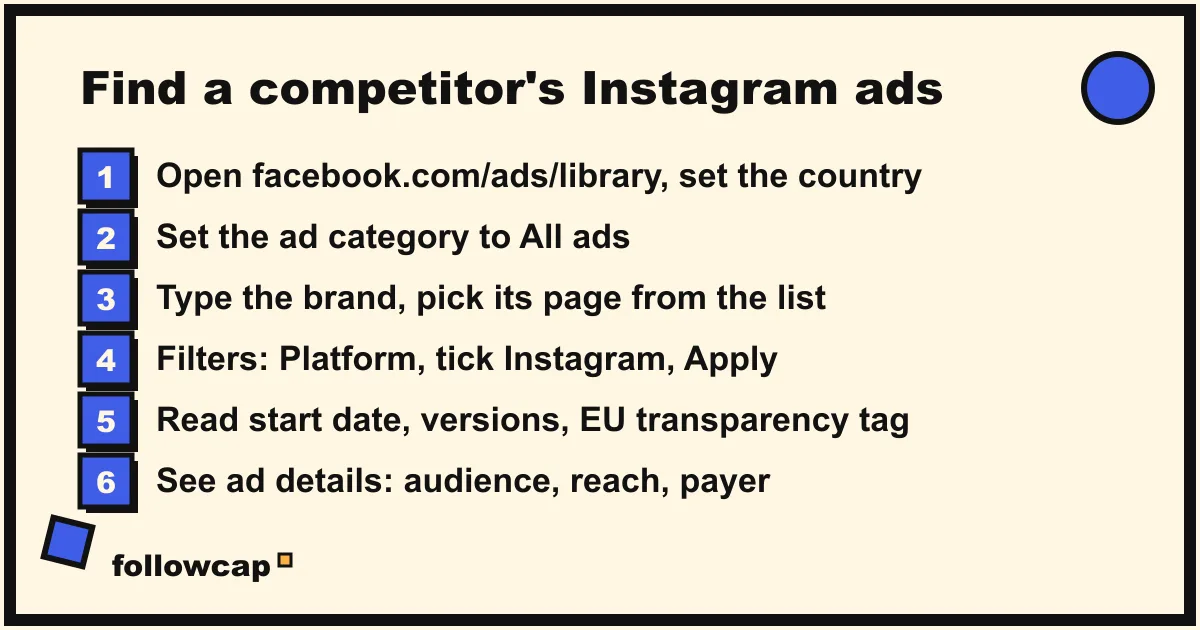
The Meta Ad Library describes itself, as of late 2026, as a search of “all the ads currently running across Meta technologies”, plus ads about social issues, elections or politics from the past seven years and ads that have run in the EU or the UK in the past year. An ad appears there within 24 hours of its first impression, and its FAQ says anyone can explore it, with or without a Facebook account. The labels below are what the web version showed in November 2026; Meta moves things, so treat them as a guide.
- Set the country. The library returns ads that reached people in the selected country, so a competitor advertising only in Germany shows nothing under United States.
- Set the ad category to All ads. The other option, Issues, elections or politics, is a separate dataset with its own rules.
- Search the advertiser. Type the brand name in Search by keyword or advertiser and pick the page from the drop-down rather than pressing Enter, which runs a keyword search across every advertiser’s ad text (a search for “nike” in the US returned about 24,000 results, most from resellers). Picking the page lands you on the advertiser’s own view, with an Ads tab, an About tab and a results count.
- Filter to Instagram. Click Filters: Language, Advertiser, Platform, Media type, Active status and Impressions by date. Under Platform tick Instagram (the others are Facebook, Audience Network, Messenger and Threads). Active status offers active, inactive or both; inactive ads are kept only for ads shown in the EU or the UK, for a year after their last impression. Click Apply.
- Read each card. Every card carries an Active or Inactive label, a Library ID, “Started running on” with the date, platform icons, “This ad has multiple versions” when the advertiser is testing variants, and an “EU transparency” tag when the ad was shown in the EU.
- Open See ad details. The panel shows the ad with a version counter (“1 of 6”), then three sections: Transparency by location, About the advertiser (the Facebook page and the Instagram handle, each with its follower count) and Advertiser and payer.
What the Ad Library shows and what it hides
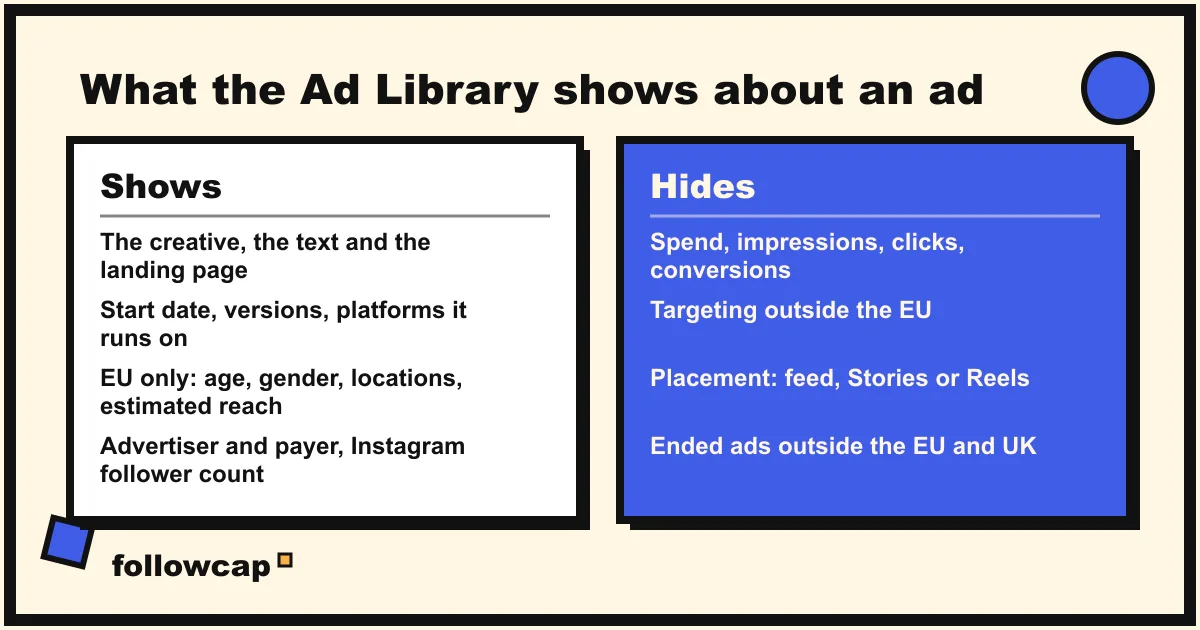
The FAQ on the library’s home page is precise. For every ad currently running you get the ad content and “basic information such as when the ad started running and which advertiser is running it”. Ads about social issues, elections or politics add “additional transparency about spend, reach and funding entities” and stay searchable for seven years. Ads that ran in the EU or the UK are archived for a year after their last impression and add the transparency described below.
That is the whole list. For an ordinary brand’s ad you do not get spend, impressions, clicks, conversions or cost per result: those live in the advertiser’s Ads Manager. Meta’s 2019 announcement A Better Way To Learn About Ads is where the library grew from political ads to “all active ads any Page is running”, and spend and impressions stayed with the political category. You do not get the placement either: the card shows a platform icon, not feed, Stories or Reels. A square creative suggests feed and a vertical one Stories or Reels, and that is an inference, not data. Targeting is hidden outside the EU.
What you can read instead is time and effort. An ad that has run for four months is paying for itself, or it would have been stopped. Ten active ads for one product in its launch week say where the budget went. Read this way, a competitor’s ad list is a budget statement without the figures.
The EU transparency panel, line by line
For any ad shown in the European Union, See ad details opens a “Transparency by location” section that Meta introduces with “We provide additional information for ads that were shown on Meta technologies anywhere in the EU”. EU ad audience lists the targeting the advertiser chose: Location, as a table of included and excluded countries, regions, postal codes or cities; Age, as the range the advertiser set; and Gender. EU ad delivery gives Reach, defined on the panel as “the number of Meta Accounts in the EU that saw this ad at least once”, marked as an estimate, with a breakdown by location, age range and gender.
Two cautions. The reach figure is for the EU only, so for a US brand it says nothing about the US. And the EU political dataset stopped growing in autumn 2025: Meta’s newsroom post Ending Political, Electoral and Social Issue Advertising in the EU says that from 6 October 2025 those ads can no longer be delivered in the EU. Commercial ads are not affected; the EU audience and delivery data still appears on them.
Below that block, Advertiser and payer names who runs the ad and who pays for it. When the payer is an agency or a parent company, you have just learned something about the competitor’s structure.
From the Instagram app: About This Account and Active Ads
The Instagram help page How do I view an account’s active ads on Instagram? gives the in-app path, still listed as of late 2026: go to the profile, tap the three dots, select About This Account, and under Active Ads view the account’s active ads in the Meta Ad Library. The same screen shows the date joined, the country, former usernames and accounts with shared followers. The page adds two limits: you must be logged in to see About This Account, and paused, cancelled or ended promotions are not shown.
This route is a shortcut to the web library, and the row can be missing on some profiles. If you do not see Active Ads, the web search above is the reliable path, and it needs no login.
Keyword search and paid partnerships
A keyword search (press Enter instead of picking a page) returns every active ad whose text contains the term, across all advertisers in the chosen country. Search your category, a product name or a claim (“30-day trial”, “vegan protein”) and you find advertisers you did not have on your list, which is the start of a proper competitor list.
The Branded Content tab is the other one. The home page describes it as a search for “posts, stories, videos and reels on Facebook and Instagram that involve a paid partnership”, filterable by app and by date. Creator ads also appear in the advertiser’s normal list, labelled “creator name with Brand”: when a competitor turns a creator’s Reel into an ad, the card tells you which creator they trusted with budget.
How to log what you find
A screenshot folder is where this research goes to die. Keep one sheet, one row per ad, and add to it on the same day each week:
| Column | What to write |
|---|---|
| Date seen | The day you logged it |
| Advertiser | Page name, and the payer if different |
| Library ID | So you can reopen the exact ad |
| Started running | From the card |
| Platforms | Instagram only, or Instagram plus Facebook |
| Format | Image, video, carousel; square or vertical |
| First line | The hook, word for word |
| Offer and CTA | Discount, trial, “Shop Now”, “Install now” |
| Landing page | The domain shown under the creative |
| EU audience | Age range, gender, included and excluded locations |
| Last seen active | Updated each week; the stop date is the signal |
Link, do not download: the creative belongs to the advertiser, and reusing it, or a close copy, is a copyright problem. And re-read the sheet monthly: the ads that survived four reviews are the ones that work.
Pair the ads with their organic posts
Ads show what a competitor pays to push; the grid shows what they publish for free and how their audience answers. A product that gets both an ad and three Reels in one week is a priority; a product that gets ads but no organic posts is probably a margin play; a Reel that did well organically and then became an ad is their proven creative. Instagram competitor analysis covers the organic half as a 30-minute weekly routine, and social media competitive intelligence shows how the two feed one weekly brief.
For the organic side there is a service we make. Followcap is our product, so read this as the maker’s description. You type the usernames of public Instagram creator or business accounts, with no Instagram login or password, and every Sunday you get one email: a 30-second summary of the week, the three posts not to miss, the best three posts of each account with a two to three line recap, their day and their link, and “what you can apply this week”. Three accounts are free, with no card and no time limit; Premium (€9 a month, 10 accounts) adds the weekly numbers per account and an archive page that keeps every post of every week; Business Pro (€29 a month, 50 accounts, 3 team users) adds a monitoring dashboard with alerts and CSV export. Its limits matter here: it covers organic posts only, never ads, so the Ad Library remains your tool for the paid side; it is weekly, not real time; it reads public creator and business accounts only; and it sees public posts, likes, comments and follower counts, so no reach, saves, views, Stories, mentions, hashtags or audience data. Paid plans are paid after the 7-day trial, with a 30-day money-back.
What to do if a competitor shows no ads
An empty result usually has a boring cause. Check the country: the library shows ads that reached the selected country. Check the page: some brands advertise under a parent company’s or a regional page, so run the keyword search and see which page the ads belong to. Check the timing: an ad takes up to 24 hours to appear. And accept the honest case: many profitable accounts, especially creators, run no ads and grow entirely on organic posts, which is why what you can and cannot see of another account is the next thing to read.
FAQ
Can I see competitors’ Instagram ads for free?
Yes. The Meta Ad Library is free, needs no account, and shows every ad currently running on Instagram, Facebook, Messenger, Threads and the Audience Network. Paid “ad spy” tools read the same public data and add filters and alerts; none can show the spend, results or targeting that the library hides.
Does the Ad Library show how much a competitor spends on Instagram ads?
No, not for ordinary commercial ads. Spend, impressions and funding details appear only for ads about social issues, elections or politics. For a brand, read how long each ad has run, how many versions it has and how many ads are active: a fair proxy for the budget.
Can I see who a competitor targets?
Only for ads shown in the European Union, where See ad details lists the targeted locations, the age range and the gender, plus the estimated EU reach by location, age and gender. Outside the EU, targeting is not disclosed.
Can I see a competitor’s old Instagram ads?
Partly. Ads shown in the EU or the UK stay for a year after their last impression, with Active status set to inactive. Political ads stay for seven years. Everywhere else an ad disappears when it stops running, which is why a weekly log with a “last seen active” column is the only history you will have.
Related reading
- How to Keep Track of Competitors on Social Media Without a Big Budget
- Instagram Monitoring: What It Is and How to Do It in 20 Minutes a Week
- Social Listening vs Social Monitoring: The Difference, With Examples
The bottom line
How to see competitors’ ads on Instagram is a solved problem: the Meta Ad Library shows every ad they are running, with the start date, the versions, the platforms and, in the EU, the audience and the reach, for free and without an account. What it hides is spend and results, so read time and effort instead, log each ad in a sheet, and pair the paid list with their organic posts, by hand or through a weekly recap such as Followcap, which we make and which covers organic posts only. Together they tell you what a competitor believes in enough to pay for, and what their audience actually rewards.