Instagram Follower Count History: How to See It (Yours and Any Account)
Instagram follower count history: your own in Insights (90-day limit), what exists for any other account, Social Blade, the Wayback Machine, and how to start a log now.
 Andrea Marino10 min read
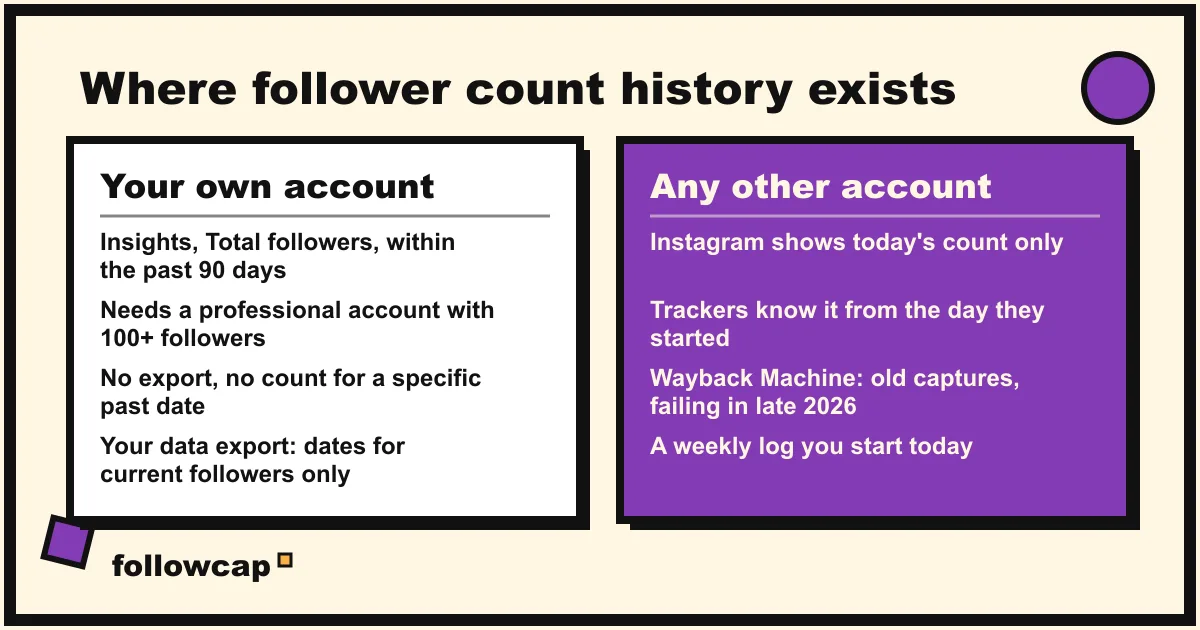
Instagram follower count history exists in exactly one official place: the Insights of your own professional account, which show follower growth for a chosen timeframe within the past 90 days. For any other account, Instagram publishes nothing but today’s count. Trackers such as Social Blade only know an account from the day they started watching it, and the Wayback Machine gives rough past values at best.
Quick answer: for your own account, open Insights → Total followers and pick a preset or custom timeframe within the past 90 days; that is the whole official history. For another account there is no official history: check whether a tracker already has it, try a Wayback Machine capture of the profile for a rough figure from years ago, and start logging the count weekly today, because the only reliable history of a public account is the one somebody started keeping.
Your own account: the follower growth chart in Insights
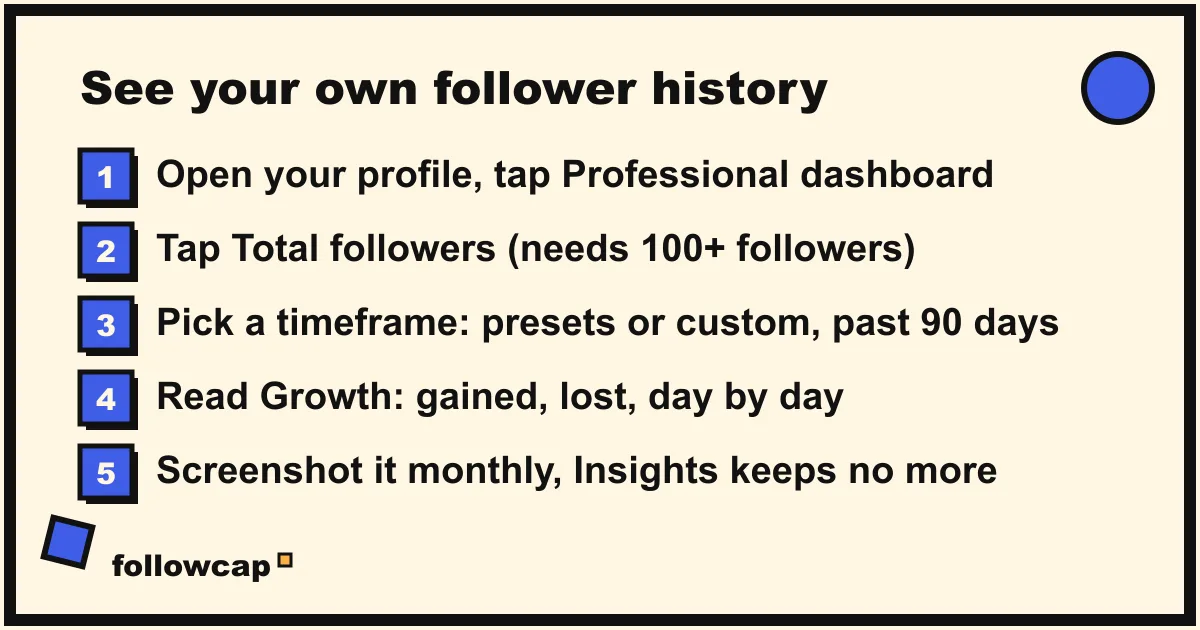
Instagram’s help page on insights says that if you have a public account you can use free insights to learn about trends across your followers, and that the Total followers section shows “Growth (number of followers you’ve gained or lost)” once you have at least 100 followers, plus top locations, age range and the times your followers are most active.
The path, as of late 2026:
- Open your profile and tap Professional dashboard (or tap ☰ and then Insights). If you see neither, your account is personal; switch to a creator or business account in Settings, which is free and reversible.
- Tap Total followers.
- Tap the dropdown at the top to choose a timeframe. Instagram’s help page describes “a preset or custom timeframe, within the past 90 days”.
- Read the Growth block: overall change, follows and unfollows for the period, with a day-by-day chart.
The help page describes the screens, not the tap path, so if your app differs, search “insights” in Settings and activity.
What the Insights chart cannot do
- Go back more than 90 days. Your count from last spring is gone unless you wrote it down.
- Give a count for a specific past date. The chart shows gains and losses per day inside the window, not a total on a given day.
- Work below 100 followers.
- Export. There is no CSV; screenshots are the archive.
- Explain the drops. It shows unfollows, not who left or why. Why you are losing followers on Instagram covers the causes, and how to see who unfollowed you covers what is honestly possible.
Other accounts: what exists and what does not
For an account that is not yours, Instagram shows one number: the follower count on the profile right now. Its developer API is the same. The reference for an Instagram user lists followers_count as “Total number of Instagram users following the user”, a single current value, and the insights metrics (including follows and unfollows) exist only for the professional account that authorised the app.
So every follower history you see for a public account comes from somebody who polled the profile repeatedly and stored the results:
| Source | Works for | How far back | Cost |
|---|---|---|---|
| Instagram Insights | Your own professional account | Up to 90 days | Free |
| Social Blade and similar trackers | Public accounts they already track | From the day tracking started | Free with login, paid tiers |
| Wayback Machine | Public profiles captured in the past | Scattered captures, often none | Free |
| Your own weekly log | Any public account | From the day you start | Free, your time |
| Weekly recap email | Public creator and business accounts you choose | From the week you add them | Free for 3 accounts |
If nobody was tracking an account in 2024, its 2024 history does not exist anywhere, and a tool that claims to show it is estimating or inventing. How to see analytics of other Instagram accounts maps what is public beyond the follower count.
Social Blade and similar trackers: history starts when they start
Social Blade is the best-known public tracker and a fair example of how the category works. Opening an Instagram profile page there in November 2026 showed the current follower, following and media counts and an engagement figure, behind a notice that you must be logged in to view Instagram statistics (a free account is enough). The history blocks for that profile said “Not enough history” and “We do not have enough data to show a useful Monthly chart”, because tracking for it had only just begun.
That is the honest state of every tracker: it knows an account from the first time someone looked it up, so your competitor’s history probably starts the day you search it. Two rules follow. Look the account up now, even if you do not need the data yet, so the history begins today. And treat the figures as a third party’s samples, taken at that site’s cadence, not as Instagram’s record.
The Wayback Machine: rough values from the past, when it works
The Wayback Machine has been saving copies of web pages for decades, and public Instagram profiles were captured many times; its index for one large account lists captures back to January 2015. When a capture renders, the profile header shows the follower count on the day of the capture, which is the only way to recover a figure from before anyone was tracking.
The catch, as of early November 2026: every Instagram profile capture we opened, from 2015, 2017 and 2019, returned “This snapshot cannot be displayed due to an internal error”, in both the normal and the raw playback modes. The captures are in the index, but playback of Instagram pages is currently failing. Try it, but do not plan around it.
How to try: go to web.archive.org, enter instagram.com/username, pick a year on the calendar and open a capture. If it loads, note the follower count and the capture date. Counts were rounded on the page (“1.2m followers”) for most of Instagram’s history, so expect a range rather than a number.
Your data export: a partial history of your own followers
Instagram lets you export a copy of your information from Accounts Center: Settings → Meta Account (or Accounts Center) → Your information and permissions → Export your information → Create export, choosing the information types, a date range and a format.
The export includes a followers file. In exports we have seen, each current follower appears with the date they followed, which lets you rebuild a cumulative curve of the followers you still have. Instagram’s help pages do not document the file’s contents, so check your own export rather than taking this as a guarantee. Two limits: people who unfollowed are not in it, so the curve only ever rises, and it covers your account only.
Start a log now: the only reliable history is the one you keep
Because nothing official reaches back, the useful move is to begin a record today, for your own account and for the three to five public accounts you compare yourself with.
The manual version takes two minutes a week: one sheet, one row per week, one column per account, the count typed in on the same weekday. After 12 weeks you have a curve; after a year you can answer last Christmas’s count without any tool. Instagram follower growth tracker compares the ways to keep it.
The automated version is where Followcap fits, and since it is our product, read this as the maker’s description. You type the usernames of public creator or business accounts, no Instagram login needed, and every Sunday you get one email with a 30-second summary, the three posts not to miss, a two to three line recap of the best posts from each account with their links, and “what you can apply this week”. Three accounts are free with no card. Premium (€9 a month, 10 accounts) adds weekly numbers per account, including follower growth week over week, plus posts, likes, comments and best post, and a personal archive page where the history accumulates; Business Pro (€29 a month, 50 accounts, 3 team users) adds a monitoring dashboard with alerts, CSV export and a “you vs your niche” view. The limits are the same as for every honest tracker: the history starts the week you add an account, not before; it is weekly, not daily or real time; it covers public creator and business accounts only; it sees public posts, likes, comments and follower counts and nothing else, so no reach, saves, views, hashtags or audience data; and the paid plans are paid after the 7-day trial, with a 30-day money-back.
What a normal follower curve looks like
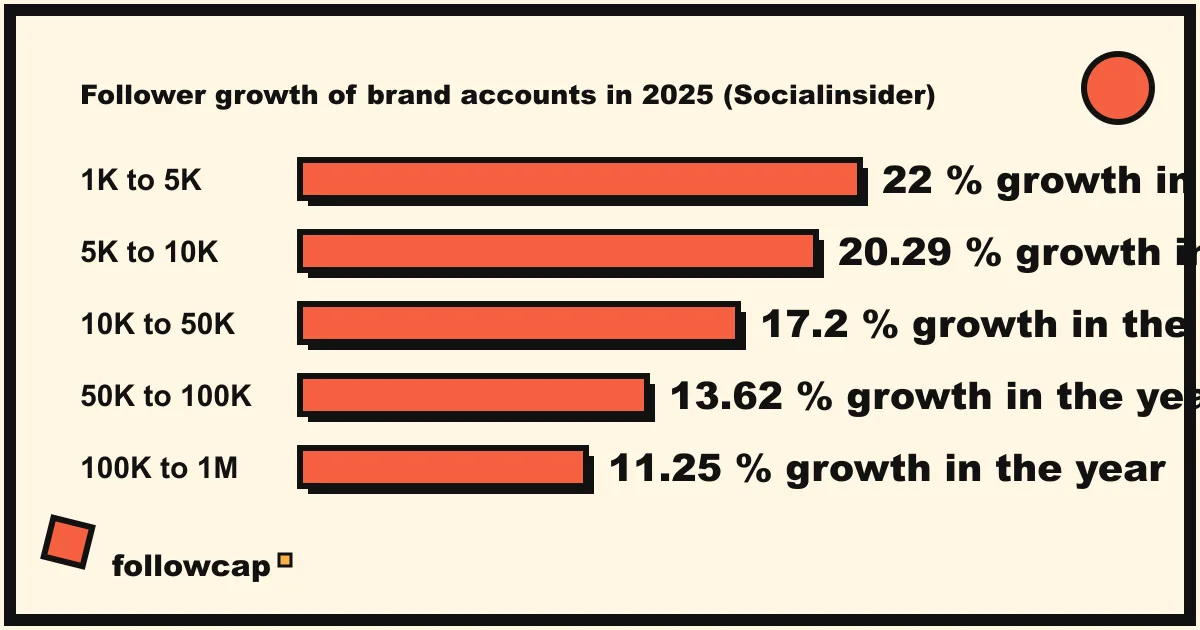
Once you have a log, you need a yardstick. Socialinsider’s Instagram benchmarks page reports that brand accounts grew their followers by between 11.25 percent (100K to 1M followers) and 22 percent (1K to 5K followers) in 2025, with 20.29 percent for 5K to 10K, 17.2 percent for 10K to 50K and 13.62 percent for 50K to 100K, all down sharply from 2024, when the same bands ranged from 27 to 38 percent. Small accounts grow faster in percentage terms because the base is small.
Read your own curve against three things: the band for your size, the accounts in your log, and your own posting. A step up on the day a Reel took off and a slow drift down afterwards is the normal shape. A flat line while the niche climbs is the signal worth acting on.
Trackers that ask for your password are a bad trade
Many “follower history” apps in the app stores ask you to log in with your Instagram account. They can see nothing a public profile does not show, because follower history is not in Instagram’s API for other accounts, so what they offer is either their own polling, which does not need your password, or activity inside your account, which does. Instagram’s Terms of Use say you cannot access or collect information in an automated way without its express permission, logged in or not, and cannot sell or purchase data obtained from the service. Handing a login to an app that scrapes on your behalf puts your account on the wrong side of that line, for a chart you could keep in a spreadsheet. The same goes for sites that promise the full history of any account “instantly”: if they cannot say since when they have been polling the profile, the chart is a guess.
What no history can tell you
A follower curve shows when the count moved, not why, and not who. It cannot show reach, how many followers actually see your posts, which followers are real, or whether the 2,000 you gained in March came from one Reel or a giveaway. Pair the curve with the posts: a count that climbs on the same days as the best posts is growth you can repeat.
FAQ
Can I see my Instagram follower count history?
Yes, for up to 90 days, in Insights → Total followers on a professional account with at least 100 followers. Instagram’s help page describes a preset or custom timeframe within the past 90 days. Nothing older is shown.
How can I see how many followers I had on a certain date?
Inside the last 90 days, the Insights growth chart gives daily gains and losses, so you can count back from today’s figure. Before that, only a record you or a tracker kept, or a Wayback Machine capture of your profile, can answer it.
Can I see another account’s follower history?
Not from Instagram. Trackers such as Social Blade show a history only from the day they first tracked the account, and the Wayback Machine may hold old captures of the profile, though playback of Instagram pages was failing in November 2026. The reliable option is a weekly log that starts now.
Why did my follower count drop suddenly?
Insights shows the unfollows for the period but not the reason. Sudden drops often coincide with Instagram removing fake or inactive accounts, a post that annoyed part of the audience, or the end of a giveaway. Compare the date against your posts, and check whether accounts like yours dropped in the same week.
Related reading
- Instagram Profile Analyzer: What It Shows for Any Public Account
- How to Monitor an Instagram Account: Yours, a Brand’s or a Creator’s
- The Best Instagram Analytics Tools in 2026 (Yours and Others’)
The bottom line
Instagram follower count history is official only for your own professional account, in Insights, for a timeframe within the past 90 days. For any other public account Instagram publishes today’s number and nothing else, so every history you find was built by someone polling the profile: Social Blade from the day it first tracked the account, the Wayback Machine from scattered captures that were not rendering in November 2026, your own sheet from the day you open it. Look the accounts up on a tracker now so their history begins, screenshot your own Insights monthly, and keep a weekly log, by hand or with a recap such as Followcap, which we make, whose history also starts the week you add an account and never earlier.