Why Am I Losing Followers on Instagram? 9 Causes and What to Do
Why am I losing followers on Instagram? The 9 real causes, from Instagram's removal of fake and inactive accounts to niche drift, how to read Insights, what to fix.
 Andrea Marino11 min read
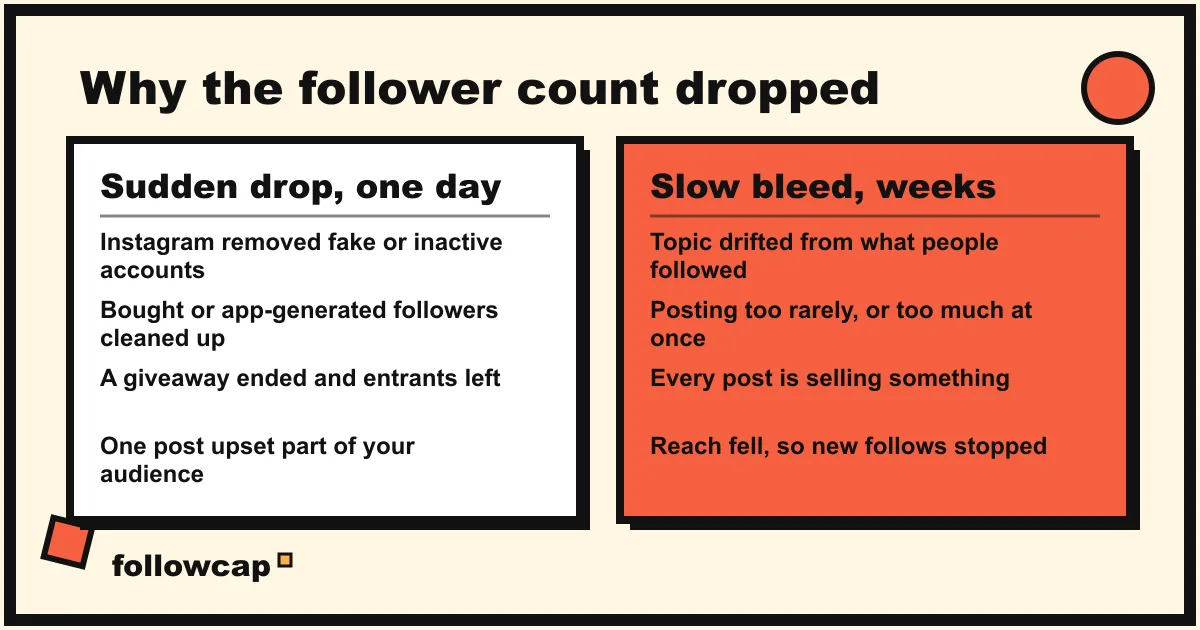
You are losing followers on Instagram for one of two kinds of reason. Either Instagram removed accounts that were following you (fake, spam, inactive or bought), or real people left because something about your account changed: topic, frequency, tone, or the reach that used to bring new followers in. The shape of the drop tells you which.
Quick answer: a drop that happens in one day, with no post behind it, is almost always Instagram removing accounts, and you do not want them back. A slow bleed over weeks is people choosing to leave, and the fix is in your content. Check the shape in Profile → Professional dashboard → Insights → Total followers → Growth, then match it to the nine causes below.
Is it normal to lose followers on Instagram?
Yes. Every account loses followers every week, including the ones growing fast. What matters is whether losses outnumber gains, and for how long.
Instagram says so itself. Its help page on changes to likes, follows and comments states: “We routinely remove disabled accounts to keep Instagram safe. This means related updates to the total number of followers on your account and the total number of accounts you follow may change, even within a short time.” A count that moves down without anyone tapping Unfollow is expected.
It is worth investigating when the drop was large and sudden, when the line has pointed down for a month or more, or when follows have stopped arriving while unfollows continue. Each has a different cause, so start with the chart.
How to read the follows and unfollows chart in Insights
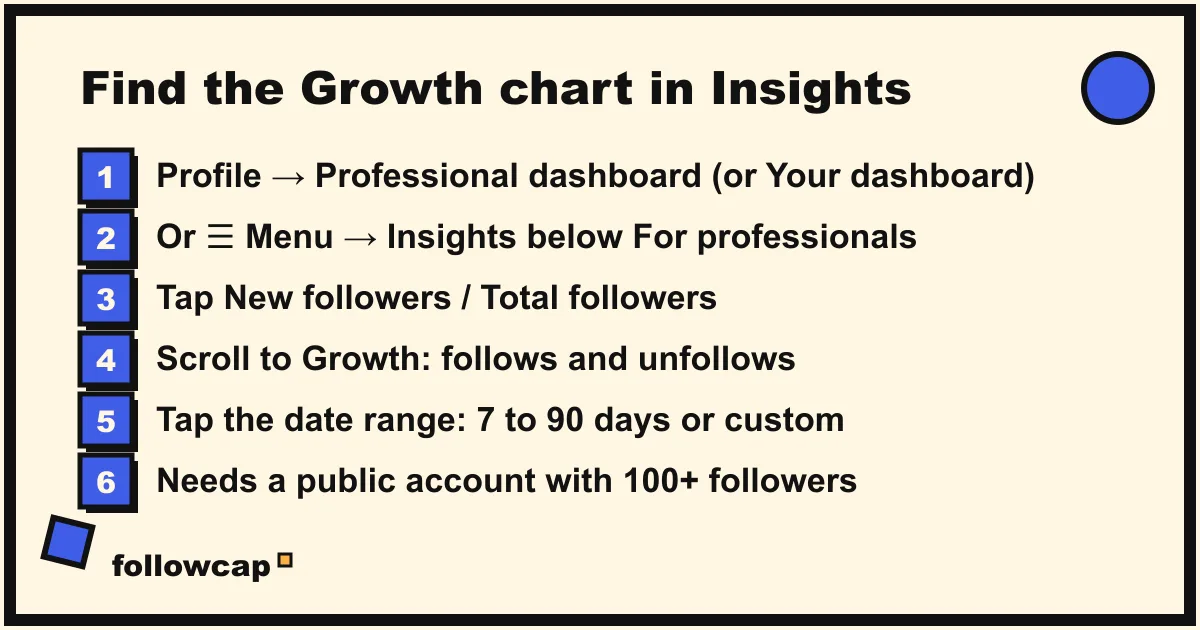
Insights does not name the people who left (for that, see how to see who unfollowed you on Instagram), but it shows follows and unfollows separately, which is what diagnoses a drop. The path is from Instagram’s help center as of late 2026.
- Open your profile and tap Professional dashboard. On a personal account the button reads Your dashboard. If you see neither, tap ☰ Menu → Insights below For professionals.
- You land on the last 30 days: Views, Interactions, New followers and Content you shared.
- Tap New followers (or Total followers, depending on your version) and scroll to Growth. The help page describes it as “Growth (number of followers you’ve gained or lost)”; on current app versions it is a bar chart of follows and unfollows per day.
- Tap the date range at the top: Last 7 days, Last 14 days, Last 30 days, Previous month, Last 90 days, or a custom range. Nothing older than 90 days is available.
You need a public account, and Total followers only appears once you have at least 100 followers. A private account has no Insights at all. Now read the shape:
| What you see in Growth | Most likely cause |
|---|---|
| One tall unfollows bar, no post that day | Instagram removed accounts (causes 1 and 2) |
| A tall unfollows bar one to three days after a giveaway or collab | Prize followers leaving (cause 3) |
| Follows and unfollows both high, every day | Follow-for-follow churn (cause 4) |
| Unfollows rising gradually since a certain week | Topic, frequency or tone changed (causes 5, 6, 7) |
| Follows near zero, unfollows unchanged | Reach dropped (cause 8) |
| A spike of follows, then a matching spike of unfollows | A post brought the wrong audience (cause 9) |
The 9 reasons you are losing followers on Instagram
1. Instagram removed fake, spam or inactive accounts
The most common cause of a sudden drop. Instagram’s help center says spam and fake accounts “may be removed from Instagram”, and that when accounts generating inauthentic activity are found “their activity is removed from Instagram”. Every removed account that followed you takes one follower with it.
The largest recent example was in early May 2026, when counts fell across the platform in a single day. Press reports quoted a Meta spokesperson describing it as a routine process for removing inactive accounts, saying “active followers remain unaffected” and that suspended accounts later restored would be added back after verification. Press figures ran to millions for the largest celebrity accounts and a few percent for ordinary creators; Meta published none.
What to do: nothing. These followers never saw your posts, so reach and engagement do not change. To keep them out in future, Instagram filters likely spam into a separate list: Profile → your follower list → Potential spam → Remove all spam followers. The filter is at ☰ Menu → Settings and privacy → Followers → Filter spam followers.
2. Followers you bought, or got from a growth app, were cleaned up
A sharper version of cause 1. If you ever paid for followers or gave an app your login so it could follow and like for you, those accounts are exactly what the cleanups target. Instagram’s help page is blunt: “If it looks like you’ve shared your login details with one of these apps, we may remove any likes or other engagement that they generated”.
What to do: change your password, remove the app’s access, accept the smaller number. The shape of the curve shows a step up when followers were bought and a trickle down afterwards; the trickle is Instagram finishing the job.
3. Giveaway, contest or loop followers are leaving
Giveaways buy follows, not followers. Entrants follow because the rules say so, and once the winner is announced a share of them leave over the next few days; loop giveaways (follow twenty accounts to enter) are the worst version.
What to do: make the prize something only your real audience wants, and judge the result by the followers you still have 30 days later. If the drop follows a giveaway, it is already explained.
4. Follow-for-follow churn
Some accounts follow you only so you follow back, then unfollow days later. If you used the tactic, the people you followed did the same to you. The chart shows both bars high every day with little net movement.
What to do: stop following to get follows, and stop following back out of politeness. The churn fades within weeks.
5. You changed topic
The quietest cause. People followed you for one thing and your recent posts are about another: a fitness account turned lifestyle account. Nobody complains; they unfollow one at a time, so unfollows rise gradually from the week the drift began.
What to do: compare your top posts of the last 90 days with the posts that got the most unfollows the day after. If the topics differ, return to the one you were followed for, or re-form the audience deliberately after checking what is trending in your niche.
6. You post too rarely, or too much at once
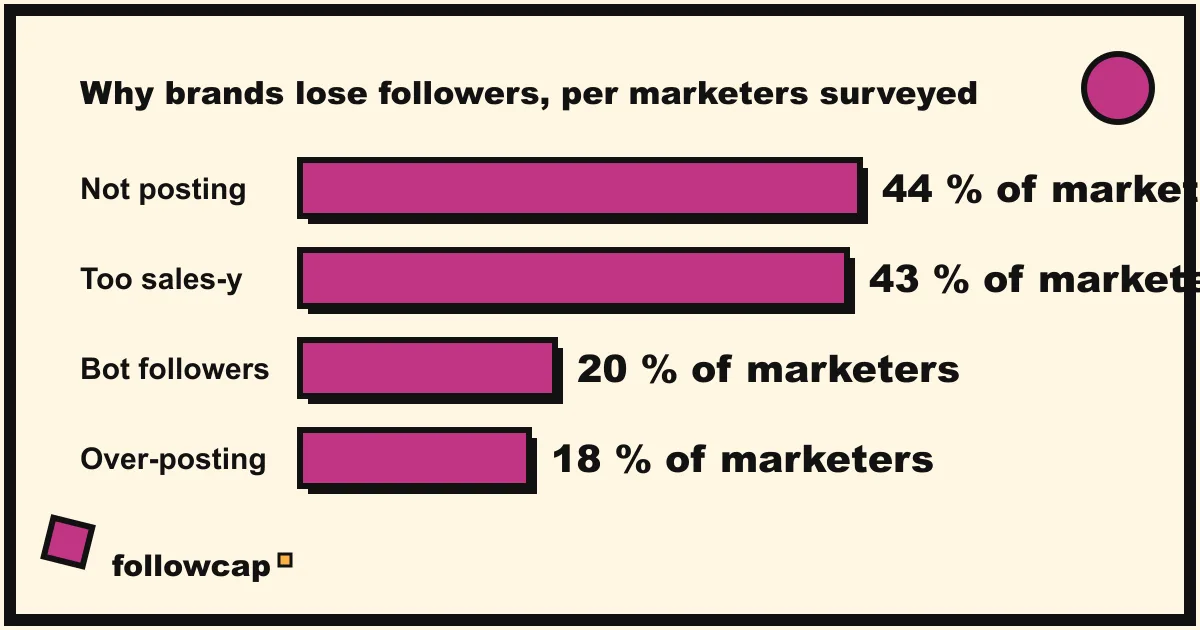
HubSpot’s survey of Instagram marketers, reported in the 2025 update of the article that currently ranks for this query, found 44 percent named not posting enough as the top reason brands lose followers, while 18 percent said posting too much had the same effect. The sample size is not published, so read the figures as a direction: silence makes people forget why they followed you, and five posts in an afternoon makes them mute or leave. How often you should post on Instagram has the benchmark data: two to five feed posts a week, kept up for months.
What to do: pick a cadence you can hold for a quarter and hold it. Unfollows during a silence stop when you restart.
7. Too much selling
The same survey put “being overly sales-y” second, at 43 percent. Launches, discount codes and “link in bio” in every caption train followers that your posts are ads, and ads get unfollowed.
What to do: count your last 20 posts. If more than a handful are a direct ask, rebalance and let the profile, stories and the occasional post carry the sell.
8. Reach dropped, so the follows stopped
Sometimes the unfollows did not change; the follows did, and normal background leaving becomes a net loss because nothing new comes in. The cause is usually reach: a run of posts that did not land, a format the audience did not follow you into, or a restriction. Instagram lists restrictions in Account Status (Profile → ☰ Menu → Account Status below More info and support), including removed content and “Features you can’t use”. If your account is not eligible for recommendation, new people cannot find you in Explore and Reels; Instagram shadowban: how to check and fix it covers that case.
What to do: check Account Status first. If it is clean, this is a content problem: compare the reach of your last ten posts with the ten before, and read how the Instagram algorithm works for what brings new accounts in.
9. A post brought the wrong audience, or upset the right one
Two mirror images with the same chart: a spike of follows followed by a spike of unfollows. Either a post went viral outside your niche and brought people who left when the next post was your usual work; or a post, collab or opinion upset part of your existing audience, who left in a cluster over two or three days.
What to do: for the first, nothing; the net is usually positive. For the second, decide whether the post was worth it. Often it was. This is the one cause where a single post explains the whole chart.
How to tell a normal month from a problem: benchmark against your niche
A loss only means something next to a baseline: accounts your size, in your niche, over the same weeks. If three comparable accounts also dipped in the first week of May 2026, it was Instagram; if they grew while you fell, it was you. Socialinsider’s 2026 Instagram benchmarks, built on 2025 data from professional accounts, put yearly audience growth at roughly 22 percent for accounts with 1K to 5K followers and about 11 percent for accounts with 100K to 1M, a few tenths of a percent a week. A week of net losses is normal; a month is a signal; a quarter is a trend. The routine is the one in Instagram competitor analysis: five to ten public accounts in your niche, their follower count recorded on the same day each week.
If logging by hand is the part that slips, Followcap is our product, so read this as the maker’s description. You type the usernames of public Instagram creator or business accounts, with no Instagram login or password, and every Sunday you get one email with a 30-second summary, the three posts not to miss, a two to three line recap of the best posts from each account with their links, and “what you can apply this week”. Three accounts are free with no card. Premium (€9 a month, up to 10 accounts) adds weekly numbers per account (posts, likes, comments, best post, follower growth) and a personal archive page; Business Pro (€29 a month, 50 accounts, 3 team users) adds a monitoring dashboard with alerts and a “you vs your niche” view. The limits: it is weekly, not real time; it only covers public creator and business accounts; it only sees public follower counts, never who followed or unfollowed anyone; it has no reach, saves, views or audience data, so it does not replace your own Insights; and paid plans are paid after the 7-day trial, with a 30-day money-back guarantee.
What to do if none of the nine fits
- The drop was today and everyone is talking about it. Instagram has more than once acknowledged bugs that changed follower counts. Check the news and wait 48 hours.
- Your account is sharing things you did not post. Instagram’s help center says your password may be compromised: change it and turn on two-factor authentication.
FAQ
Why am I losing followers on Instagram all of a sudden?
A one-day drop with no post behind it is almost always Instagram removing fake, spam, disabled or inactive accounts, which its help center says it does routinely. Those followers were never real viewers, so your reach does not change.
Is Instagram deleting inactive accounts in 2026?
Instagram has published no schedule, but its help pages say it routinely removes disabled, spam and fake accounts, and in May 2026 press reports quoted a Meta spokesperson attributing a platform-wide drop to the removal of inactive accounts. Expect occasional one-day dips.
How many followers is it normal to lose per month?
Instagram publishes no figure, and the “0.5 to 2 percent a month” numbers on marketing blogs are unsourced. The useful benchmark is net growth: Socialinsider’s 2026 report puts yearly audience growth around 22 percent for small professional accounts and 11 percent for very large ones. A net line that is flat or slightly up over a quarter is normal.
Can I see who unfollowed me on Instagram?
Not in the app. Insights shows counts, not names. You can search your followers list for one person, or export your followers from Accounts Center and compare two exports; both are in how to see who unfollowed you on Instagram. Apps that promise a live unfollower list need your password.
Related reading
- Best Time to Post on Instagram in 2026 (and How to Find Yours)
- How Often Should You Post on Instagram? What the Accounts in Your Niche Actually Do
- Instagram Shadowban: How to Check, What Causes It and How to Fix It (2026)
The bottom line
Instagram removes fake, spam, inactive and bought accounts routinely and sometimes in one-day sweeps, as in May 2026, and those losses cost you nothing. Real people leave slowly when your topic drifts, your cadence breaks, every post sells, or your reach drops so new follows stop covering the normal churn. The Growth chart in Insights tells you which family you are in; a few accounts in your niche over the same weeks tell you whether it was you or the platform. Keep that benchmark by hand, or with a weekly recap of public accounts like Followcap, which we make, and a follower drop becomes a date with a cause.