Instagram Shadowban: How to Check, What Causes It and How to Fix It (2026)
Instagram shadowban explained: what Instagram actually says, how to check Account Status, the causes it names, the fixes that work and how to tell it from a reach drop.
 Andrea Marino11 min read
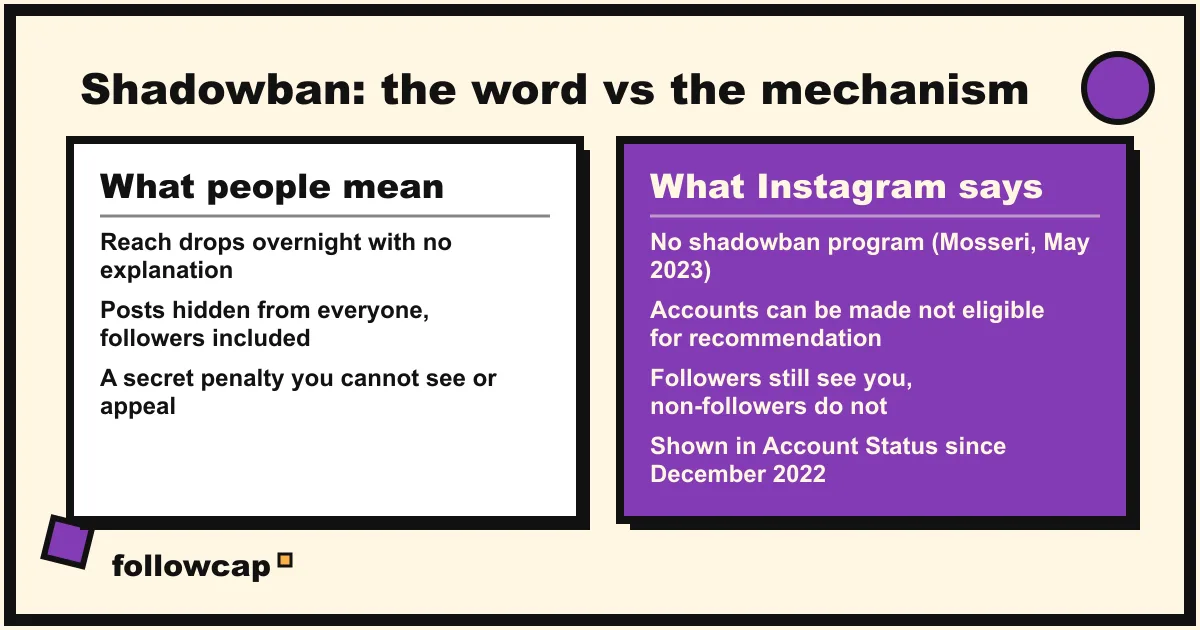
An Instagram shadowban is the name people give to a sudden, unexplained drop in reach. Instagram says it has no such program, but it does stop recommending some accounts and posts to non-followers, and since December 2022 it tells professional accounts when that happens. The check is Account Status, not a third-party tester.
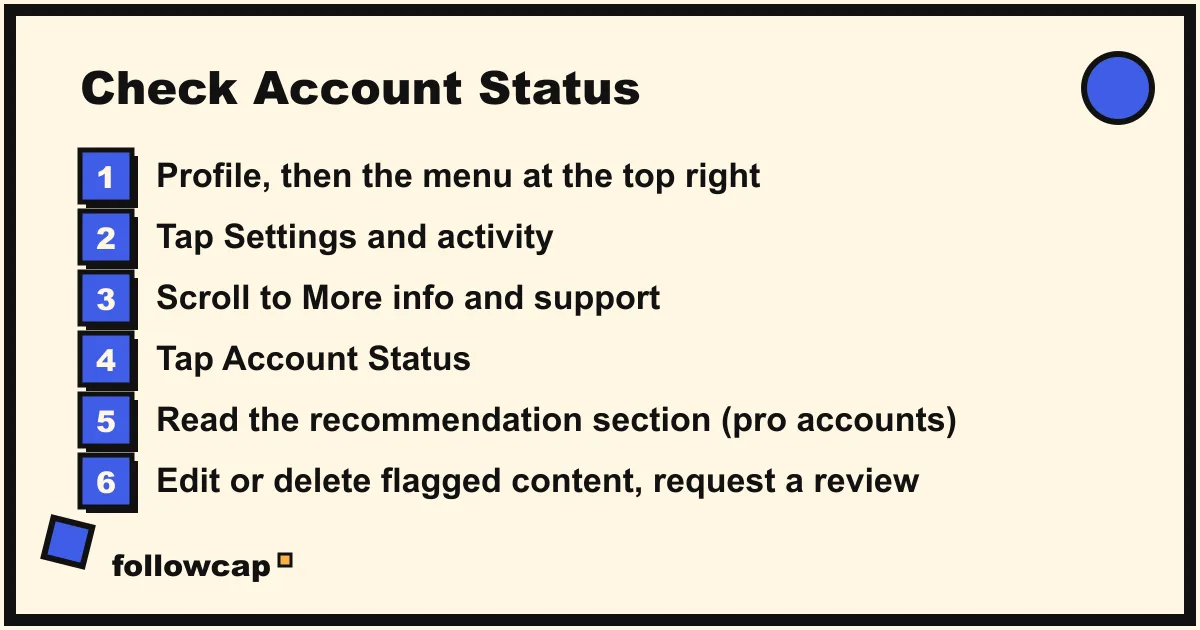
Quick answer: open your profile → ☰ → Settings and activity → scroll to More info and support → Account Status. If a section says your account or a post is not eligible to be recommended, that is the official version of a shadowban: edit or delete the content Instagram shows you, request a review if you think it is a mistake, and wait. If everything is green, you are not restricted; the reach drop has another cause.
Is the Instagram shadowban real?
Both camps are partly right, which is why the argument never ends.
Instagram’s clearest statement is Adam Mosseri’s post “Instagram Ranking Explained” from May 31, 2023. It says shadowbanning has no single definition, that some people use it to mean an account or its content is limited or hidden without explanation, and that “when we rank content across Instagram, that’s not our intention.” It adds that “we don’t suppress content to encourage people to buy ads.”
The same post then describes exactly what people are complaining about. Instagram has Recommendations Guidelines that are stricter than its Community Guidelines. Content that breaks them is not removed; it is simply not recommended in Explore, Reels, Search, suggested posts and suggested accounts. And an account that repeatedly breaks them, or the Community Guidelines, is told that “none of their posts will be eligible for recommendation for a period of time.”
So: no secret list, no silent penalty for annoying the algorithm, but a documented, account-level state called “not eligible to be recommended” that cuts you off from non-followers while your followers still see you. That state is what most real shadowbans are. Everything else is a normal reach drop, which Instagram warned about in 2021: “we can’t promise you that you’ll consistently reach the same amount of people when you post.”
Mosseri’s line in creator Q&As, as reported in October 2025, is the same: no official shadowbanning program, but reach limits for certain accounts under certain circumstances, visible in Account Status.
How to check if you are shadowbanned: Account Status
Account Status launched in October 2021 for removed content and disabling risk. On December 7, 2022 Instagram expanded it so professional accounts can see whether their content is eligible to be recommended to non-followers; April 2023 added Search and Suggested Accounts eligibility, June 2023 feature restrictions, and October 2025 availability to teens under 18, all listed on Instagram’s own announcement page.
The path, as of late 2026:
- Open your profile and tap ☰ at the top right.
- Tap Settings and activity. Older app versions label the screen Settings and privacy.
- Scroll to More info and support and tap Account Status. Instagram’s help page places it “below More info and support”; if you cannot find it, type “account status” into the search bar at the top of Settings.
- On the website, the equivalent is More (bottom left) → Settings → Account Status. This web path is widely reported but not written up on Instagram’s help pages, so use the app if it is missing.
Instagram’s help page on recommendation eligibility lists what the screen does: shows whether your content is eligible to be recommended in Explore, Search, Suggested Accounts, Reels and Feed; whether your profile picture or bio breaks the Recommendations Guidelines; a sample of flagged posts or reels and the guideline that applies; all content removed under the Community Guidelines; and lets you edit or remove the flagged content and request a review.
Two conditions: the recommendation section is shown to professional accounts (creator or business), and the guidelines “only apply to public accounts and to recommendations for people who don’t follow you,” so a private account has nothing to check.
How to read what you see
- All green. Nothing is flagged; you are not shadowbanned in any sense Instagram recognises.
- “Your account is not eligible to be recommended.” Account-level. The help page is blunt: “none of your content will be recommended,” whether or not every post breaks the rules. Followers still see you in Feed and Stories.
- A specific post or reel is flagged. Post-level; the rest is unaffected unless flags pile up.
- “Features you can’t use.” A separate limit on comments, follows, DMs or Live, usually after activity that looked automated.
Why third-party shadowban checkers do not work
None of them can see Account Status, which is private to your login. The username-only testers look at public pages and guess, so new and quiet accounts get flagged because low engagement looks the same from outside as a restriction. The testers that ask for your password or a session cookie are a worse trade: you hand a stranger your account to get a number Instagram shows you for free. The same goes for anyone offering to remove a shadowban for a fee. The old hashtag test (post with a rare hashtag, ask a non-follower to search it) depended on hashtag pages behaving as they did in 2018; Instagram has reorganised them several times since, so a missing post proves nothing.
What causes an Instagram shadowban?
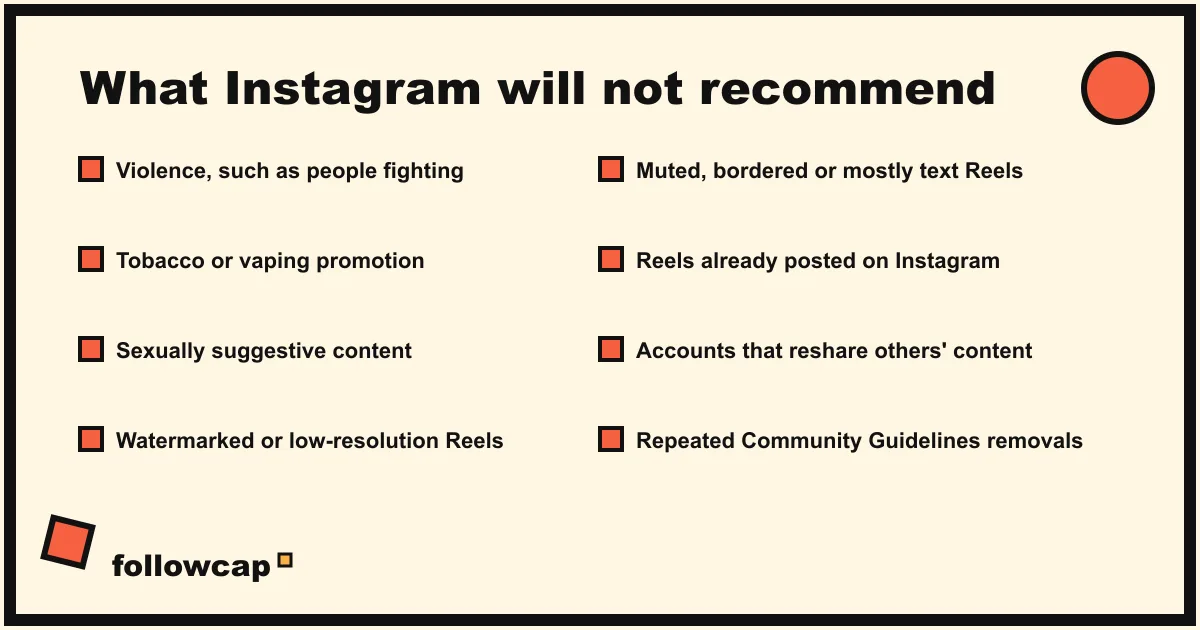
Every cause below is one Instagram has named itself. Rumours such as “more than 30 hashtags” or “posting twice in an hour” are not in any Instagram document we could find.
1. Content that breaks the Recommendations Guidelines. The creators blog gives three examples: content that may depict violence, “such as people fighting”; content that promotes certain regulated products, “such as tobacco or vaping products”; and content that may be sexually explicit or suggestive, “such as pictures of people in see-through clothing.” One such post is flagged on its own. Repeatedly posting them, or having a profile photo or bio that breaks the guidelines, “may make your entire account ineligible for recommendation.”
2. Recent or repeated Community Guidelines removals. The same page says these can make the whole account ineligible for recommendation, on top of the removals themselves.
3. Low-quality or recycled Reels. Mosseri’s May 2023 post says Instagram makes certain Reels less visible: “low-resolution or watermarked reels, reels that are muted or contain borders, reels that are majority text,” and reels already posted on Instagram. The “Tips for Improving Your Reach” page adds that accounts that “regularly collect and reshare others’ content” are less likely to be recommended. These are ranking decisions, not Account Status flags, so they never show as a restriction; they quietly cost you non-follower reach. How to repost on Instagram covers the ways that do not trip this.
4. Activity that looks automated. Mass following, unfollowing, liking or commenting, usually through a growth app that has your password, triggers the limits under “Features you can’t use.”
5. Bought engagement. A terms violation, and the fake accounts vanish in Instagram’s periodic clean-ups, one of the causes in why you are losing followers on Instagram.
How to fix an Instagram shadowban
- Open Account Status and read the flags. Each names the guideline and shows the sample content.
- Edit or delete what is flagged. Instagram’s wording: “you can edit or delete posts that may go against our Recommendations Guidelines.” If the flag is on your profile, change the photo or bio.
- Request a review if it is a mistake. The 2023 post: “if anything makes your content less visible, you should know about it and be able to appeal.” Reviews take days, not hours.
- Remove every app that has your password. Settings and activity → Website permissions → Apps and websites, remove anything you do not recognise, then change your password.
- Stop the behaviour behind a feature limit and do not repeat it from a second device.
- Post normally. There is no evidence that going silent for 48 hours helps; reposting the flagged content makes it worse.
How long does it last? Instagram’s only words are “for a period of time”; the 14-day and 30-day figures on other blogs are guesses. The state lifts after the flagged content is gone and no new flags arrive, on Instagram’s schedule.
Shadowban or a normal reach drop? How to tell
Most people who search this term are not restricted at all. Instagram said in June 2021 that “most of your followers won’t see what you share, because most look at less than half of their Feed,” and reach moves for reasons that have nothing to do with you.
| Sign | Points to a restriction | Points to a normal drop |
|---|---|---|
| Account Status | A flag on the account or a post | All green |
| Non-follower reach in Insights | Falls to almost zero while follower reach holds | Both move together |
| Timing | Starts the day a post was removed or a warning arrived | Gradual, or starts when you changed format or rhythm |
| Which posts | All of them, overnight | One or two, usually with a weaker hook or an off-topic subject |
| Your niche | Only you | Accounts like yours are down too |
The Insights check matters most. Open a recent post → View insights → look at the split of reach (or views, on current versions) between followers and non-followers. A restriction removes you from Explore and Reels, so non-follower reach collapses while followers are untouched. A normal drop usually hits both, because it comes from the content: a weaker opening line, a format ranked lower this quarter, or a topic your followers skip. How the Instagram algorithm works covers those signals.
The last row is the one almost nobody checks: whether your niche is down with you. Likes and comments on a handful of comparable public accounts, tracked week by week, tell you whether a 30 percent dip in November is yours or everyone’s. That is something Followcap does, and since it is our product, read this as the maker’s description. You type the usernames of public creator or business accounts, with no Instagram login, and every Sunday you get one email with a 30-second summary, the three posts not to miss, a two to three line recap of the best posts from each account with their links, and “what you can apply this week.” Three accounts are free with no card; Premium (€9 a month, 10 accounts) adds weekly numbers per account (posts, likes, comments, best post, follower growth) and an archive page; Business Pro (€29 a month, 50 accounts, 3 team users) adds a dashboard with alerts and a “you vs your niche” view. The limits: weekly, not real time; public creator and business accounts only; it sees public posts, likes, comments and follower counts and nothing else, so no reach, views or Account Status, which only you can see for your own account; and paid plans are paid after the 7-day trial, with a 30-day money-back. Instagram competitor analysis explains which accounts to compare and what to compare.
What to do if Account Status is green but reach is still down
- Compare formats, not the account. Your last 10 Reels against your last 10 carousels in Insights. If one fell and the other did not, Instagram is ranking the format differently, not hiding you.
- Check against benchmarks. A 2 percent engagement rate on a 50,000-follower account is normal, not a penalty; see Instagram engagement rate benchmarks before deciding something is wrong.
- Wait a full week. Three bad days are weather; three bad weeks are a trend.
- Use Report a problem only for bugs. Settings and activity → Help → Report a problem is a bug form, not an appeal channel.
FAQ
How do I know if I am shadowbanned on Instagram?
Open your profile → ☰ → Settings and activity → More info and support → Account Status. If your account or any post is marked as not eligible to be recommended, that is Instagram’s official version of a shadowban. If everything is green, you are not restricted.
How long does an Instagram shadowban last?
Instagram does not publish a duration. Its creators blog says an account that repeatedly breaks the Recommendations Guidelines will not be recommended “for a period of time.” Two-week and 30-day figures on other sites are estimates. The state lifts after the flagged content is edited or removed and no new flags arrive.
Does Instagram admit that shadowbanning exists?
It denies the word and admits the mechanism. Adam Mosseri wrote in May 2023 that limiting content without explanation is “not our intention,” and in the same post explained that accounts breaking the Recommendations Guidelines are not recommended to non-followers for a period, which Account Status shows.
Can a personal account be shadowbanned?
It can have content removed, features limited and recommendations withdrawn, but it cannot see the recommendation section of Account Status. Switch to a creator or business account (free, reversible) to see it. A private account is never recommended to non-followers anyway.
Do hashtags cause a shadowban?
Not in anything Instagram has published. A hashtag whose page Instagram has restricted only means that post is not shown under that tag, and the “more than 30 hashtags” rule is a rumour.
Will deleting the flagged post fix it?
For a post-level flag, yes: Instagram says you can edit or delete flagged content. For an account-level restriction, deleting the samples is step one; the state then lifts on Instagram’s schedule. Do not repost the same content.
Related reading
- Best Time to Post on Instagram in 2026 (and How to Find Yours)
- How Often Should You Post on Instagram? What the Accounts in Your Niche Actually Do
- Why Am I Losing Followers on Instagram? 9 Causes and What to Do
The bottom line
Instagram does not run a shadowban, but it does mark accounts and posts as not eligible to be recommended, and since December 2022 it shows professional accounts exactly that in Account Status (Settings and activity → More info and support). Check there first, ignore the third-party testers, edit or delete what Instagram flags, request a review when it is wrong, and remove any app that has your password. If Account Status is green, the drop is content or ranking, not a penalty: compare formats in Insights, fix the hook, and check whether accounts like yours are down too, which a weekly tracker such as Followcap, which we make, can show you from public likes and comments alone.