Instagram Close Friends: How It Works and Who Can Tell (2026)
Instagram Close Friends explained: the green ring, stories, posts, Reels and notes shared to the list, how to edit it, whether people are notified, and what it cannot do.
 Andrea Marino11 min read
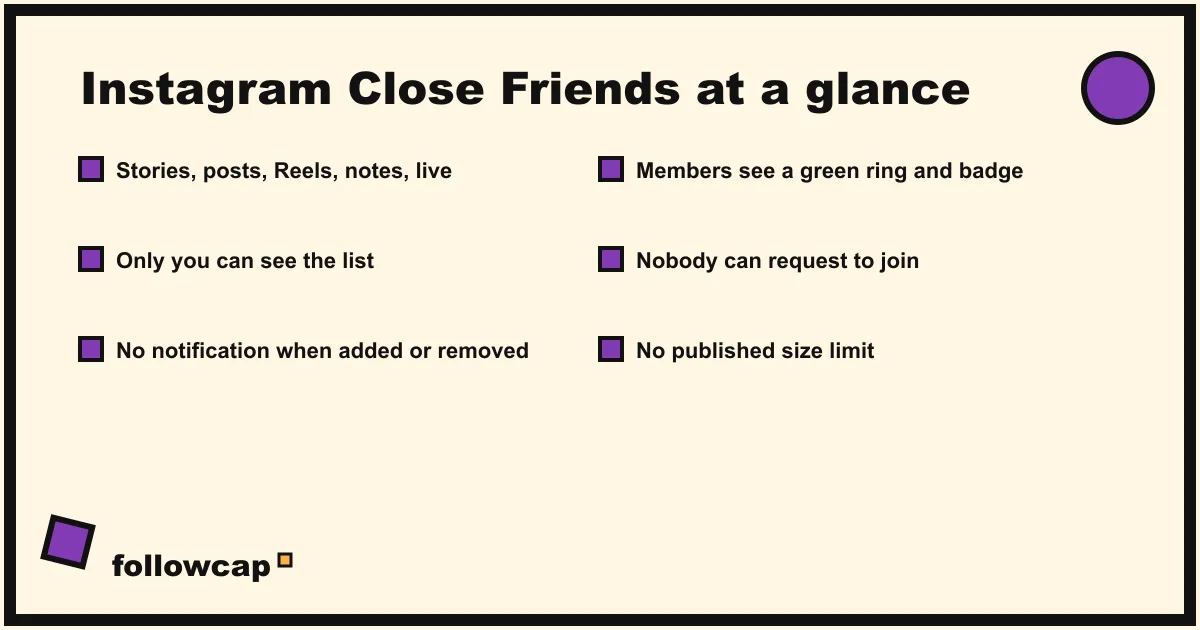
Instagram Close Friends is a private list you build from your followers. Anything you share to it, a story, a post, a Reel, a note or a live, is visible only to the people on the list. Nobody is notified when you add or remove them, but members see a green ring and a “Close Friends” label, so they know they are on it.
Quick answer: Profile → ☰ Menu → Close Friends (under Who can see your content) → tap Select next to each person, or Search → Done. To share, pick Close Friends at the bottom of the story composer, or Audience → Close Friends on a post or Reel. People are not told when they are added or removed, nobody can see your list, nobody can ask to join it, and there is no published limit on its size.
What is Instagram Close Friends?
Close Friends is Instagram’s audience control. Instagram’s help center, checked in late 2026, describes it in one sentence: “You can create a Close Friends list on Instagram so that when you share things like a post, note, reel, or story, you can choose for only people on that list to see it.”
It started smaller. The feature launched on 30 November 2018 for stories only, with Instagram’s announcement promising that “only you can see your close friends list and no one can request to be added.” Notes, Instagram’s short text statuses, got a Close Friends audience when they arrived in late 2022. On 14 November 2023 Instagram extended the list to feed posts and Reels, marked with a green star in the feed, and on 20 June 2024 it added “Close Friends on Live”. One list, every format; the same people see all of it.
What has not changed since 2018: the list is yours, it is secret, and it works in one direction. It controls who sees what you share, nothing about what you see, which is the job of Favorites, covered below.
How to make and edit your Close Friends list
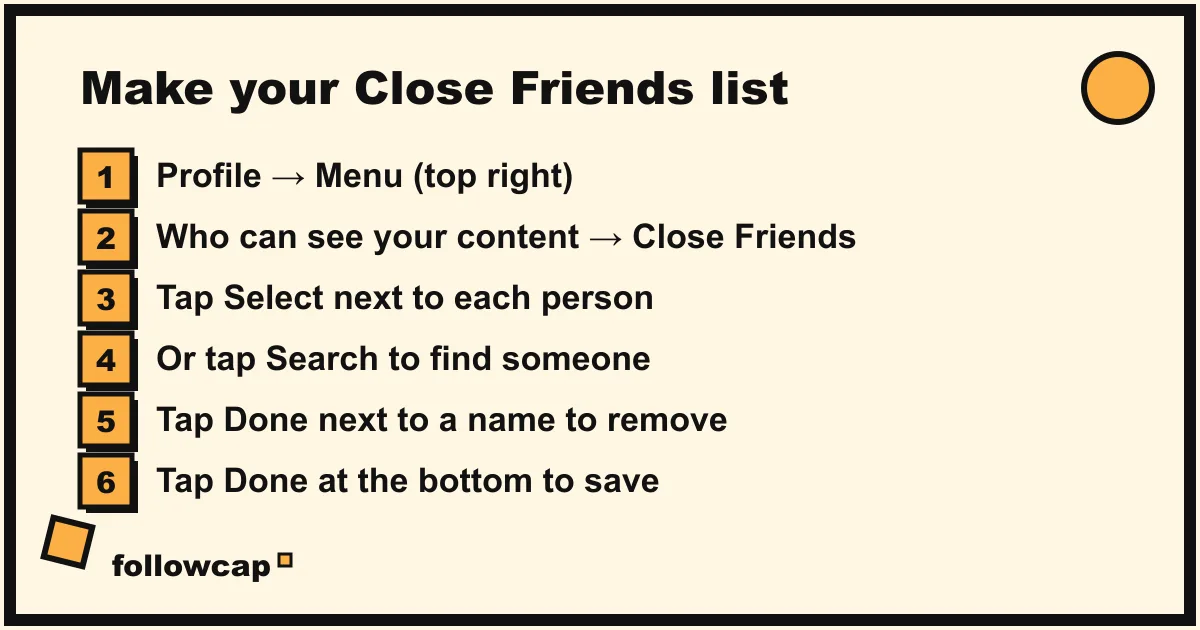
The path and labels below come from Instagram’s help center page “Create a Close Friends list on Instagram”, as of late 2026, and are the same on iPhone and Android.
- Tap Profile (your picture, bottom right).
- Tap ☰ Menu in the top right.
- Under Who can see your content, tap Close Friends.
- Tap Select next to each person you want on the list. Tap Search at the top to find someone by name.
- To remove someone, tap Done next to their name (the button toggles).
- Tap Done at the bottom to save.
Instagram’s page adds the two sentences that settle most questions: “People won’t be notified when you add or remove them from your list. You can update your list at any time.”
Two details the help page leaves out. There is no published limit: Instagram has never stated a maximum, and the picker keeps accepting names; the practical limit is the point of the feature, since a list of 500 is just a second feed. And the list is a gate, not a follow: people on it see Close Friends content only if they can see your account at all, so on a private account that means followers. If you want the list to mean something, build it from followers.
How to share a story, post, Reel, note or live with Close Friends
Each format has its own switch, and the labels differ slightly.
Story. From Instagram’s page “Share a story with your Close Friends list”: tap Create at the top or swipe right from Feed, tap Story, shoot or pick a photo, then when you are ready, tap Close Friends at the bottom instead of Your story. Close Friends stories expire after 24 hours like any other, and replies arrive as normal DMs.
Reel. From “Share a reel with your close friends list”: tap Create, tap Reel, record or pick clips, tap Next, then tap Audience and select Close Friends, tap Back, then Share.
Feed post. The same Audience control sits on the final share screen of a photo or carousel: tap Audience, select Close Friends, tap Done, then Share. The post appears in members’ feeds with a green star badge and is not on your grid for anyone else.
Note. When you write a note from the inbox, the audience picker offers Close Friends alongside the default of followers you follow back.
Live. Tap Create → Live and choose the Close Friends audience before going live. Instagram’s June 2024 announcement said a Close Friends live can include up to three guests.
One sentence the help pages stress for Reels and posts, worth knowing before you share: “If someone on your Close Friends list likes, comments on or shares your reel, others on your Close Friends list will be able to see their username and how they interact with your reel.” Close Friends is a smaller room, not a private one. Everyone in the room can see who else is talking.
Who can tell they are on your Close Friends list?
This is the question most people actually have, so here is the complete answer as Instagram states it.
The people on the list know. Instagram’s help page says it directly: “When someone is added to your Close Friend list, they’ll see Close friends when viewing your notes, reels or stories that lets them know they’re part of your list. They may also see a green ring around your profile photo.” The ring is green instead of the usual pink and orange gradient, the story carries a green Close Friends badge with a star, and feed posts and Reels show the green star.
They are not told when it happens. There is no notification for being added and none for being removed. Someone added today finds out the next time you share something to the list; someone removed finds out only by noticing, weeks later, that your stories are no longer green.
Nobody can see the list. Not followers, not members, not people you have removed. Members cannot see how many people are on it or who else is, with the one exception above: likes, comments and shares on a Close Friends post or Reel are visible to the other members.
Nobody can see which lists they are on. There is no screen showing “accounts that have you as a Close Friend”; the only evidence is the green ring, one account at a time. Any app that promises such a list is guessing, exactly like the ones that promise who views your Instagram profile.
You cannot remove yourself, yet. As of late 2026 there is no way to leave someone’s Close Friends list. In January 2026 Meta confirmed to TechCrunch that it is building a “remove yourself” option, described as still in the early stages and not being tested publicly. Until it ships, muting someone on Instagram hides their content from you while you stay on their list.
Close Friends vs Favorites: which one do you need?
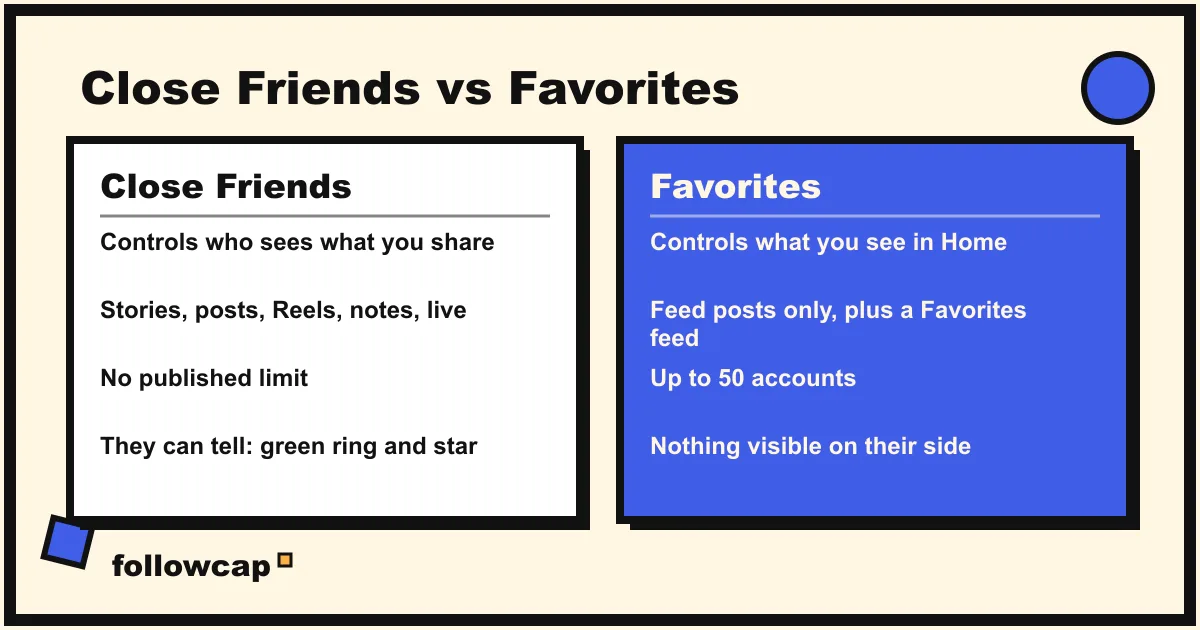
Both are lists, both use a star icon, and they do opposite jobs.
| Close Friends | Favorites | |
|---|---|---|
| What it changes | Who sees what you share | What you see in your Home feed |
| Direction | Outbound | Inbound |
| Who goes on it | People who follow you | Accounts you follow |
| Limit | None published | 50 accounts |
| Can they tell? | Yes: green ring, Close Friends badge, green star | No: nothing visible on their side |
| Notified when added or removed? | No | No |
| Where to manage it | Profile → ☰ → Close Friends | Instagram logo on Home → Favorites → list icon |
| Covers | Stories, posts, Reels, notes, live | Feed posts only |
If you want certain people to see more of you: Close Friends. If you want to see more of certain people in your own feed: Instagram Favorites. If you want a creator’s posts without opening the app at all, neither list helps; see the section on creators below.
What Close Friends does not do
- It does not hide your public content. Everything you share to “Everyone” stays public. Close Friends adds a private lane; it does not make the main road private. For that, switch the account to private.
- It does not stop screenshots or sharing. Members can screenshot, screen record and describe what they saw, and Instagram does not notify you of story screenshots.
- It does not change Highlights. A Close Friends story added to a Highlight keeps its audience: only current list members see that Highlight. This is widely reported but not written on Instagram’s help pages, so test it with a friend before relying on it.
- It is not a notification. Being on someone’s list does not alert you when they post; you still have to be in the app. For public accounts you care about, per-account post notifications, explained in how to get notified when someone posts on Instagram, are the alert.
Is Close Friends useful for creators and businesses?
Yes, in a specific way. Since posts and Reels joined stories in 2023, creators use Close Friends as an inner circle: early drops, behind-the-scenes, discount codes, sometimes a paid tier with subscribers added by hand. Instagram’s own tool for one-to-many updates is broadcast channels, which are public and joinable; Close Friends is the opposite, closed and chosen.
For the person following a creator, Close Friends has one consequence worth knowing: whatever they share to the list is invisible to anyone not on it, and to any tool outside Instagram. That includes us. Followcap is our product, so read this as the maker’s description: you type the usernames of public creator or business accounts, with no Instagram login, and every Sunday you get one email with a 30-second summary, the three posts not to miss, a two to three line recap of the best posts from each account with their links, and “what you can apply this week”. Three accounts are free with no card; Premium (€9 a month, 10 accounts) adds weekly numbers per account (posts, likes, comments, best post, follower growth) and an archive page; Business Pro (€29 a month, 50 accounts, 3 team users) adds a monitoring dashboard with alerts and a monthly PDF report. The limits are the point here: it is weekly, not real time; it covers public creator and business accounts only; it sees public posts, never stories, Close Friends content, reach, saves, views or audience data; and paid plans are paid after the 7-day trial, with a 30-day money-back. If a creator’s best material lives in Close Friends, the only way to see it is to be on the list; a weekly email covers the public side.
What to do if Close Friends is not working
- No Close Friends option in the menu. Update the app and reopen it. The list has been on every account since 2018, so a missing entry is a version problem.
- No Close Friends button in the story composer. Your list is empty. Add at least one person from Profile → ☰ → Close Friends.
- Someone on the list cannot see the story. They may not be able to see your account (private account, not a follower), or they have muted you. Check their name is still selected.
- Audience is missing on a post or Reel. It sits on the final share screen, below the caption. Update the app if it is not there.
FAQ
Does Instagram notify someone when you add them to Close Friends?
No. Instagram’s help center states that “people won’t be notified when you add or remove them from your list.” They find out indirectly: the next story, post, Reel or note you share to the list shows them a green ring and a Close Friends label.
Can people see your Close Friends list on Instagram?
No. Only you can see your list. Members cannot see who else is on it or how many people it holds, and nobody can request to be added. The single exception is on Close Friends posts and Reels, where likes, comments and shares from one member are visible to the other members.
How do you know if you are on someone’s Close Friends list?
You see a green ring around their profile picture in the stories tray when they share a Close Friends story, a green Close Friends badge on the story itself, and a green star on their Close Friends posts and Reels in your feed. If you have never seen any of those, you are either not on the list or they have never used it.
Is there a limit to the Close Friends list?
Instagram has not published one, and as of late 2026 the list accepts as many people as you add. Favorites, the other list, is capped at 50, which is one reason the two get confused.
Can you remove yourself from someone’s Close Friends list?
Not yet. In January 2026 Meta confirmed it is developing a way to leave someone’s list, but said it was in early stages and not being tested publicly. Until it ships, muting or unfollowing hides their content from you, but you stay on their list.
Related reading
- How to Know if Someone Blocked You on Instagram (2026)
- How to See Someone’s Activity on Instagram (What Is Public in 2026)
- Instagram Story Viewers Order: What It Means (2026)
The bottom line
Instagram Close Friends is a private list that controls who sees the stories, posts, Reels, notes and lives you choose to share to it. You manage it from Profile → ☰ → Close Friends, there is no published size limit, nobody can see the list or ask to join it, and nobody is notified when they are added or removed. People on it do know, because Instagram shows them a green ring, a Close Friends badge and a green star, and they cannot yet remove themselves. It is the outbound counterpart of Favorites, which only changes your own feed. For the public side of the creators you follow, the side Close Friends never covers, a weekly summary like Followcap, which we make, fills the gap.