How to Keep Up With Instagram Without the App
Keep up with Instagram without the app: 5 setups from lightest to strictest, what you lose (DMs, stories) and how to handle it, plus a 7-day plan to switch.
 Andrea Marino9 min read
You can keep up with Instagram without the app, as long as you replace the feed with something that brings you the people you care about on a schedule you choose. The trick is not willpower; it is moving from push to pull. This guide gives you five setups, from lightest to strictest, what each one costs you, and a 7-day plan to make the switch stick.
Quick answer: Move from push to pull. Subscribe to your creators’ newsletters, get a weekly recap email for the ones who only post on Instagram, and if you keep an account, use it on desktop only in one fixed slot. Delete the app last, not first, because the reason you reinstall is the people you follow.
Why deleting the Instagram app alone usually fails
Most people who try to use Instagram less start by deleting the app. It works for a few days, then someone mentions a creator’s new post and you reinstall “just to check”. Two weeks later nothing has changed.
The reason is simple: you did not open the app for the feed. You opened it for a handful of people, and deleting the app cut you off from them without a replacement. The feed was the price you paid to see them. Remove the price without replacing the product and you will pay it again.
The numbers show how much is at stake. People spend about 2 hours 21 minutes a day on social media on average (DataReportal, Digital 2025) and check their phone around 144 times a day (Reviews.org, 2023, US). After each interruption it takes about 23 minutes to refocus, according to research by Gloria Mark at UC Irvine. Yet the content from the people you care about fits in minutes a week: ten creators post about 58 reels, posts and stories in a typical week. Catching those by scrolling costs roughly 12 hours; reading a recap of the same 58 posts takes about 5 minutes.
So the goal is not “less Instagram”. It is “the same people, a different pipe”.
Push versus pull: the one principle behind every setup
A push system decides when you look: a notification, a refreshed feed, a red badge. A pull system waits for you: an inbox you open at a set time, an email that arrives on Sunday and does not care whether you read it on Sunday or Wednesday.
Instagram is almost entirely push. Its home feed is ranked by an algorithm, and Instagram has said it personalizes what you see based on signals like your activity and your relationship with each account, which is why you do not even see every post from the people you follow (we explain this in why Instagram isn’t showing posts from people you follow). Every setup below replaces push with pull. The further down the list, the more push you remove, and the more you need a good pull source in its place.
5 setups to keep up with Instagram without the app
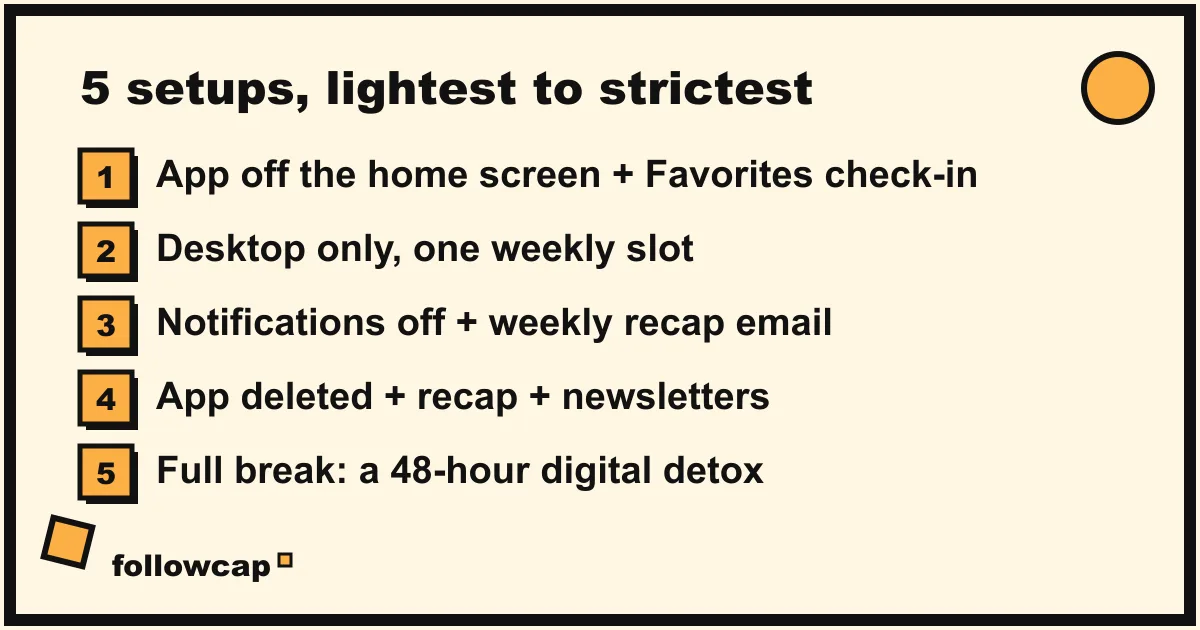
Start with the lightest one that solves your problem. You can always tighten later.
1. App off the home screen, plus a Favorites check-in
What you do: keep the app, but move it into a folder off the first screen and turn off all its notifications. Then build a Favorites list: on a creator’s profile, tap the “Following” button and add them to Favorites, up to 50 accounts. When you open Instagram, tap the Instagram logo at the top left and choose Favorites to see only those accounts, in chronological order.
What to know: Favorites is not the default. The app returns to the ranked feed every time you reopen it, so you need the extra tap each time, and the ranked feed is right there if you forget. This reduces noise but not the pull of the app itself.
Good for: people who want fewer interruptions and are not ready to leave the app.
2. Desktop-only Instagram, in one weekly slot
What you do: delete the app from your phone and use Instagram only in a browser on your computer, in one fixed slot, say Sunday at 10am for 20 minutes. Use the Favorites or Following feed there too, so you catch up in order.
What to know: the browser version is slower and less sticky than the app, which is the point. When we tested it, the biggest change was that “a quick check” stopped being possible on the bus or in bed.
Good for: people who still post and reply occasionally, without the phone habit.
3. Notifications off, plus a weekly recap email
What you do: turn off every Instagram notification, move the app off the home screen (or delete it), and get the creators’ posts delivered to your inbox once a week.
This is what we built Followcap for, so take this paragraph as the maker’s view. You type the usernames of the public creator or business accounts you want to follow, with no Instagram login or password, and every Sunday you get one email: a 30-second summary of their week, the 3 posts not to miss, a 2 to 3 line recap of the best posts from each account with their links, and a short “what you can apply this week”. It is weekly, not real-time, so it is useless for a product drop you must catch within the hour. It covers public accounts only, so friends with private profiles are out. Three creators are free; more than that is paid after a 7-day free trial, from €9 a month for up to 10 creators, so it only makes sense if these creators are a real part of how you learn or work.
What to know: a recap removes the “did I miss something?” anxiety that drives most reinstalls, but not chatting with friends or watching stories.
Good for: people who follow Instagram for learning, work or inspiration, and want to stop checking.
4. App deleted, plus a recap and the creators’ newsletters
What you do: everything in setup 3, plus you go through your creator list and subscribe to their newsletters, podcasts or YouTube channels where they exist. Most serious creators publish somewhere besides Instagram, and that version of their work is usually longer and better. The recap covers the ones who post only on Instagram.
What to know: this takes an hour of setup, mostly hunting for links in bios. After that, your creator intake lives in your inbox and a podcast app, both pull systems, and the app has no job left. We wrote a longer version of this in how to stay up to date without social media.
Good for: people who are done with the app but not with the people.
5. A full break
What you do: delete the app, log out everywhere, tell the people who DM you to use another channel, and take a defined break: two days, two weeks, or a month. For a structured start, our digital detox ideas include a 48-hour version you can run this weekend.
What to know: a break is a reset, not a system. When it ends you still need one of the setups above, or you drift back. Use the break to notice which accounts you actually missed; that short list becomes your Favorites or recap list afterwards.
Good for: anyone who wants a clear line, including people showing the signs of social media addiction.
What you lose without the app, and how to handle each
- DMs. The real loss for most people. Move your closest contacts to a messaging app before you leave, and check DMs in the browser in your weekly slot. Tell people you reply on Sundays.
- Stories. They disappear after 24 hours, so no recap or newsletter replaces them. If a creator’s stories matter, keep setup 1 or 2 for them.
- Serendipity. The post you did not know you needed, from an account you did not follow. Some of that is real. Replace it deliberately: once a month, spend ten minutes exploring on desktop and add one new creator.
- Posting. The browser handles most feed posts, batched into the weekly slot. If you post daily for work, you need setup 1 or 2.
- Speed. A weekly recap means you see Tuesday’s post on Sunday. For learning, that is fine. For time-sensitive drops, turn on post notifications for that one account; we compared the options in how to get notified when someone posts on Instagram.
A 7-day plan to switch
Each step takes 10 to 20 minutes.
- Day 1: make the list. Write down every account you would genuinely miss. Most people stop between 10 and 25.
- Day 2: find their other channels. For each account, check the bio for a newsletter, podcast or YouTube link and subscribe. Mark the ones who publish only on Instagram.
- Day 3: set up the pull source. Build a Favorites list, or start a weekly recap for the Instagram-only accounts, or both. With a recap, the first email arrives within 24 hours.
- Day 4: kill push. Turn off every Instagram notification. Move the app off the home screen or delete it.
- Day 5: move your conversations. Tell the people you DM most where to reach you now.
- Day 6: book the slot. A recurring 20-minute “catch-up” block in your calendar, on desktop, once a week. The only time Instagram gets.
- Day 7: review. Did you miss anything that mattered? Add it to the list. Did you reinstall? Note why and fix that reason. Then decide whether to stay at this setup or tighten by one.
You will know it is working within two weeks: you stop reaching for the phone in gaps, you can name what your creators posted this week, and your weekly slot ends on time. For the same list-first approach applied to every app, see how to spend less time on your phone.
FAQ
Can I keep up with Instagram without an account at all?
Partly. As of 2026, a public profile may show a few posts in a browser before a login wall appears, and behavior varies by region. To follow people over time without an account, you need another channel: their newsletter or podcast, or a weekly recap email for public accounts that needs no Instagram login.
Will I miss stories if I delete the app?
Yes, unless you keep the browser version and check within 24 hours. Stories are not available by email or RSS. If a few creators’ stories matter to you, keep a Favorites check-in for them.
Does a weekly recap email work for every account?
No. It works for public creator and business accounts; private accounts, friends included, are not covered. A weekly recap is also not a notification system, so anything you need within the hour still needs post notifications.
How long does it take to stop missing the app?
In our experience, about two weeks, provided the people you follow are reaching you another way. Without that, the craving does not fade; it waits.
Related reading
- How to Stay Up to Date With Creators Without Social Media
- Instagram Broadcast Channels: Join, Leave and Create One (2026)
- Dopamine Detox: What It Is, What Science Says, and a 7-Day Plan
The bottom line
To keep up with Instagram without the app, replace the feed, not the people: newsletters and podcasts for the creators who publish elsewhere, a weekly recap for the ones who post only on Instagram, and a desktop slot if you still need DMs or stories. Delete the app last, once the pull sources are in place. If Instagram creators are part of how you learn or work, start a free Followcap trial and let one Sunday email cover them; it is our product, weekly rather than real-time, and public accounts only.