Instagram Audit Checklist: 25 Points to Review Your Account (2026)
An Instagram audit checklist with 25 points: profile, content mix, posting rhythm, engagement, Reels, Stories, alt text, Account Status and a comparison with your niche.
 Andrea Marino11 min read
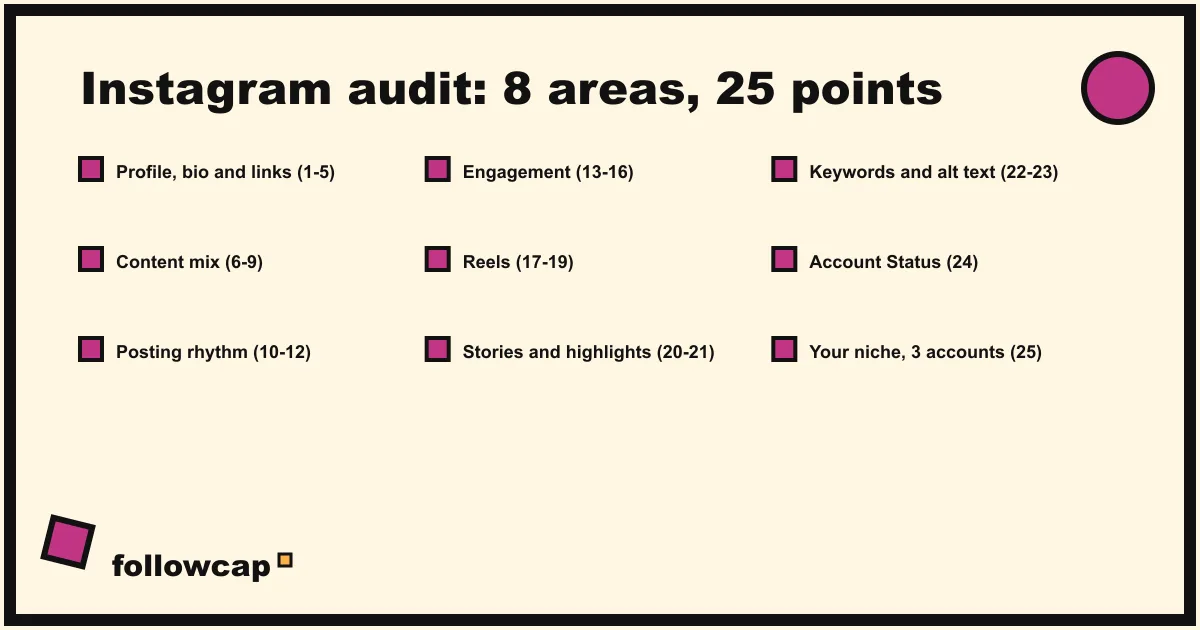
An Instagram audit is a structured review of one account: profile, content, rhythm, engagement, Reels, Stories, discoverability, account health, and how all of that compares with accounts like yours. The 25-point checklist below takes about 90 minutes with Instagram Insights open and ends with a list of fixes ranked by effort.
Quick answer: open Insights on the Last 90 days preset, open your profile as a visitor would (logged out or in a private window), pick three public accounts in your niche, and work through the 25 points in order: profile (1 to 5), content mix (6 to 9), posting rhythm (10 to 12), engagement (13 to 16), Reels (17 to 19), Stories and highlights (20 to 21), keywords and alt text (22 to 23), Account Status (24) and the niche comparison (25). Mark each point pass, fix or skip, then do the ten-minute fixes first.
What an audit is, and what it is not
Most guides on this query describe an audit as a strategy exercise: goals, brand voice, tools. Those are planning. An audit looks at what is actually on the account today and in the last 90 days of data, point by point, and produces a list of things to change. It is also not a one-off: Instagram changes its features, ranking and Insights screens several times a year, so a quarterly pass is realistic.
Before you start
Instagram Insights. As of late 2026, Instagram’s help page About Instagram insights says insights are available to public accounts for any period within the past 90 days, with an overview of Views, Interactions, New followers and Content you shared, and Accounts engaged split between followers and non-followers. Switch to a professional account if you have not; it is free and reversible, and the recommendation section of Account Status only shows for creator and business accounts.
A sheet. One tab for the 25 points (pass, fix, skip) and one for numbers. Insights only looks back 90 days, so what you type today is the baseline for the next audit.
Three public accounts in your niche. Similar size, similar topic, ideally one slightly ahead of you.
A visitor’s view of your profile. Logged out, or in a private browser window.
The 25-point Instagram audit checklist
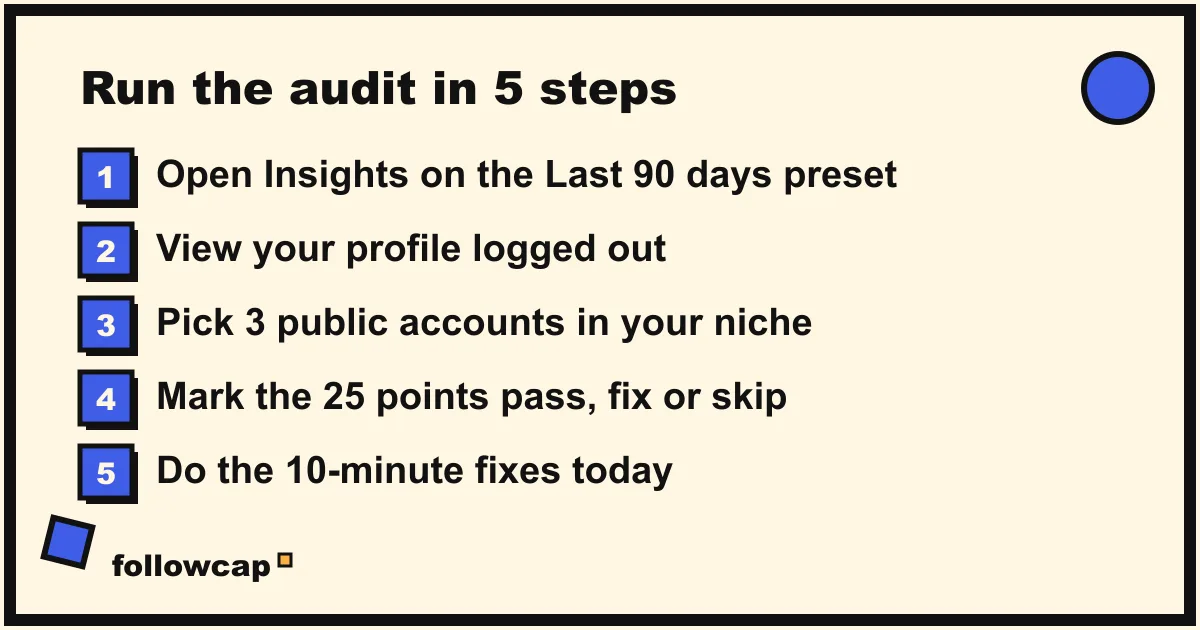
Mark each point pass, fix or skip.
Profile: points 1 to 5
- The name field contains what people search for. The username is your handle; the name field is a separate, searchable line. “Marie | Florist Lyon” is findable, “Marie” is not.
- The profile photo reads at thumbnail size. Check it in the comments under someone else’s post, where it is smallest. A logo with small text becomes a smudge there.
- The bio says what you do and for whom in the first line. Instagram’s help page on adding a bio sets the limit at 150 characters, and the first line is what a visitor reads before deciding to scroll.
- Links are live and in the right order. Instagram’s help pages document adding and reordering links under Edit profile → Links; the first one shows on the profile. The limit rose to five in April 2023, announced on Mark Zuckerberg’s broadcast channel rather than in a help article, so check your own Links screen. Tap each link: a dead link is the most common failure and the fastest fix.
- Category, contact buttons and pinned posts are current. Check that the category still matches what you do, and that the three pinned posts are your best current work, not your oldest announcement.
Content mix: points 6 to 9
- Every post in the last 90 days belongs to one of three to five topics. Label your last 30 posts. More than five labels means an unfocused account; 25 of 30 under one label means growth stalls when that topic cools.
- The format split is deliberate. Count reels, carousels, images and collaborative posts in the same 30, then filter the Insights content library by interactions. If carousels earn the most and you publish mostly images, that is a decision waiting to be made.
- Original content outnumbers reposted content. Instagram’s tips for improving your reach say to post original content and avoid reposts, and that it is less likely to recommend reposted reels or visibly watermarked content. Count both in your last 30.
- The grid looks like one account. Scroll it as a visitor: one colour range, readable cover text, no run of six near-identical thumbnails.
Posting rhythm: points 10 to 12
- Posts per week are stable. Work out posts per week for each of the last 12 weeks; 6, 0, 0, 5, 1 tells you more than the average. Socialinsider’s 2026 Instagram benchmarks, from 67.5 million posts by 579,000 brand accounts, found brands published around 8 reels, 5 carousels and 7 images a month in 2025; a sense check, not a target. How often should you post on Instagram sets the number from your niche.
- Posting times match when followers are active. Under Total followers, Insights shows the hours your followers are most active once you have 100 followers. A gap of several hours between that and when you post is a free fix.
- Stories go out on most days. Count the days in the last four weeks with at least one story. Stories reach existing followers, the cheapest audience you have.
Engagement: points 13 to 16
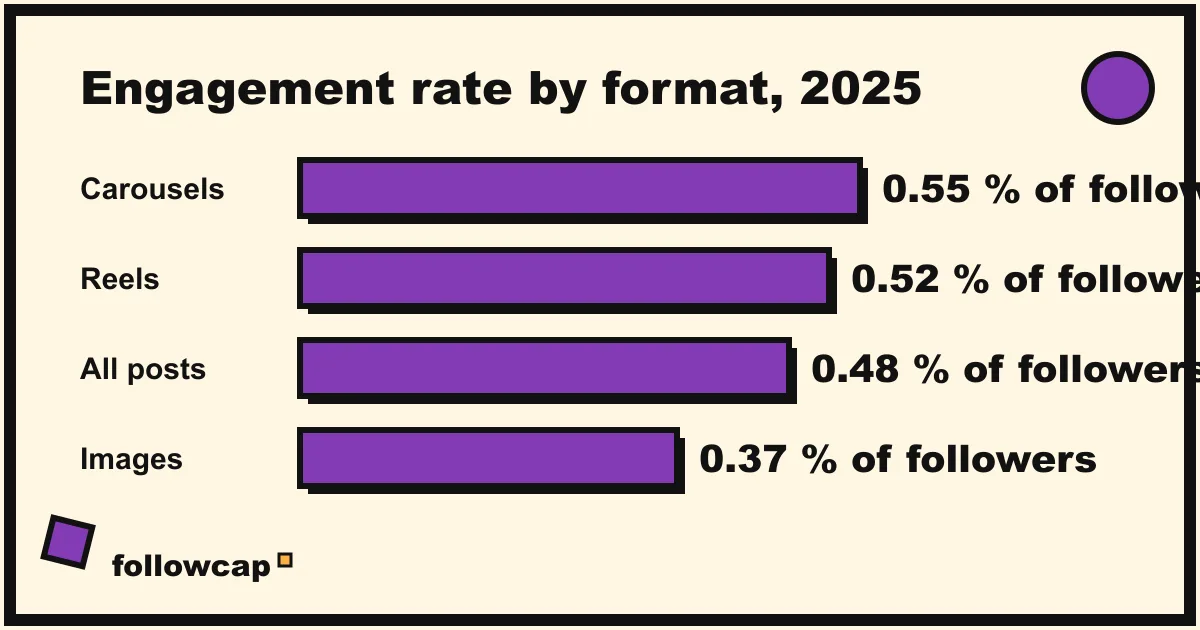
- Engagement rate is known and compared with the right benchmark. Likes plus comments on your last 30 posts, divided by 30, divided by followers, times 100: see how to calculate your Instagram engagement rate. Socialinsider’s 2026 benchmarks put brand accounts at 0.48 percent in 2025 (0.50 in 2024), with carousels at 0.55, reels at 0.52 and images at 0.37. Small accounts and creators run higher, so use Instagram engagement rate benchmarks for your size.
- Saves and shares are tracked, not just likes. Insights counts interactions as likes, comments, saves and shares. A saved post is a reference, a shared post is a conversation starter; note which of your ten best posts did which.
- Comments get replies within a day. Count the unanswered comments on your last ten posts; the number should be close to zero.
- Follower growth is net and explained. Insights shows followers gained and lost under Total followers. For any week you lost more than you gained, look at what you posted; why am I losing followers on Instagram lists the causes.
Reels: points 17 to 19
- The first three seconds do a job. Instagram’s creators blog said in February 2025 that view rate in Insights shows the share of people who keep watching past the first three seconds. Watch your last ten reels with the sound off; Instagram hook examples has openings that work.
- Average watch time is checked, not only views. Reel insights list views, watch time, viewers, average watch time and follows. The reel strangers watched longest is the one to make more of, even with fewer views.
- Reels are clean: no watermark, no borders, native resolution. Point 8 covers Instagram’s wording on watermarks. Also check for text under the interface buttons or the caption area, which is cut off on most phones.
Stories and highlights: points 20 to 21
- Highlights are named for a visitor, with covers, and the first four matter. Instagram’s help page on Story Highlights notes they stay until you remove them, so most profiles carry highlights from years ago. Delete the stale ones and name the rest by what a visitor wants (“Prices”, “Start here”, “Reviews”).
- Stories use at least one interactive sticker a day. Story insights count replies, shares, sticker taps and link taps. A chain of reposted feed posts gives people nothing to tap.
Keywords and alt text: points 22 to 23
- Keywords are in the caption, bio and hashtags, and hashtags are relevant rather than many. The same reach tips say to include relevant keywords “in your content, your caption, your bio, and your hashtags” and warn that content shown to uninterested audiences loses distribution. Check your last ten captions for a hashtag block copied unchanged.
- Alt text is written, not automatic, on your best posts. Instagram’s help page on editing alternative text gives the path as Options → Edit → Accessibility on a published post, or Accessibility before sharing. It is read by screen readers, so write one line for every new image post and the pinned ones.
Account status: point 24
- Account Status is green. Instagram’s page on outages and Account Status explains that since December 2022 professional accounts can see whether their content is eligible to be recommended to non-followers, with later additions for Search and Suggested Accounts (April 2023) and feature restrictions (June 2023). Path: profile → ☰ → Settings and activity → More info and support → Account Status. Anything flagged is the first fix on the list; Instagram shadowban explains each flag.
Comparison with your niche: point 25
- Three accounts in your niche are measured with the same numbers. Posts per week, format split, average likes and comments, follower change, best post and why. All public; views, reach, saves, watch time and audience are not, for any account that is not yours, and no tool can show them. If all four accounts lost engagement in October, the fix is not your bio.
This is the point most audits skip because it is slow by hand. Followcap is our product, so read this as the maker’s description: you type the usernames of public creator or business accounts, no Instagram login, and every Sunday one email gives you a 30-second summary, the three posts not to miss, a short recap of the best posts from each account with their links, and “what you can apply this week”. Three accounts are free, no card; Premium (€9 a month, 10 accounts) adds weekly posts, likes, comments, best post and follower growth per account; Business Pro (€29 a month, 50 accounts) adds a dashboard, CSV export and a “you vs your niche” view. Limits: weekly, not real time; public creator and business accounts only; public posts, likes, comments and follower counts, so no reach, saves, views or audience data; paid after the 7-day trial. The manual version is in Instagram competitor analysis.
What to fix first
Sort the fixes by effort, not importance:
- Under ten minutes, today: dead links (4), stale highlights (20), category and pinned posts (5), unanswered comments (15), anything in Account Status (24).
- Under an hour, this week: name and bio (1, 3), profile photo (2), alt text on pinned posts (23), posting times (11), hashtag blocks (22).
- Needs a content decision, this month: topics (6), format split (7), posting rhythm (10), the three-second hook (17), the story routine (12, 21).
- Needs data over time: engagement rate (13), follower trend (16), watch time (18) and the niche comparison (25), revisited at the next audit against today’s baseline.
Write the date of the next audit at the top of the sheet; three months is a reasonable gap.
What the audit cannot tell you
Insights only looks back 90 days at account level, so an audit cannot show a year of decline unless you kept your own numbers. For other accounts you only have public numbers, and any tool that claims a competitor’s reach, saves or audience is estimating or inventing. And an audit finds the gaps without explaining why a post worked; that comes from the weekly habit of writing one line on your best post and your niche’s best post, which is what a weekly social media report is for.
FAQ
What is an Instagram audit?
A point-by-point review of an account as it is today: profile, bio and links, content mix, posting rhythm, engagement, Reels, Stories and highlights, keywords and alt text, Account Status, and a comparison with a few accounts in the same niche. It produces a list of fixes ranked by effort.
How often should you audit your Instagram account?
Every three months. Account insights cover the past 90 days, so a quarterly audit uses a full window of data each time.
How do I audit my Instagram account for free?
Insights, a sheet and this checklist are enough. Insights is free for public accounts, and a professional account, free to switch to, adds Account Status. The only cost is the time to compare with other accounts by hand from their public profiles.
What is a good engagement rate on Instagram?
For brand accounts, Socialinsider’s 2026 benchmarks report an average of 0.48 percent of followers per post in 2025, with carousels highest at 0.55 percent and images lowest at 0.37 percent. Small accounts and creators usually run well above that, so compare with accounts of your size.
Can I audit someone else’s Instagram account?
Only the public parts: profile, bio, links, highlights, grid, posting rhythm, likes and comments where shown, and follower count. Their Insights, reach, saves, watch time and Account Status are private to them, and no tool can show those.
Does Account Status matter for a personal account?
A personal account sees Account Status for removed content, but the recommendation eligibility section is shown to professional accounts. If you care about reaching non-followers, switch to a creator account to see it.
Related reading
- The Best Instagram Analytics Tools in 2026 (Yours and Others’)
- Instagram Follower Count History: How to See It (Yours and Any Account)
- Instagram Profile Analyzer: What It Shows for Any Public Account
The bottom line
An Instagram audit is 25 checks, not a strategy retreat: five on the profile, four on the content mix, three on rhythm, four on engagement, three on Reels, two on Stories and highlights, two on keywords and alt text, one on Account Status, and one comparison with three accounts in your niche. Open Insights on the Last 90 days preset, look at your profile as a visitor, mark each point pass or fix, and do the ten-minute fixes today. Type your numbers into a sheet so the next audit has a baseline, and keep the niche comparison alive between audits, by hand or with a weekly recap such as Followcap, which we make, from public posts, likes and comments alone.